Showing posts with label Flight Simulator. Show all posts

Sunday, March 21, 2021

Manual installation of our Microsoft Flight Simulator aircrafts - STEP BY STEP guide

Background

While we tried to provide clear and comprehensive instructions to install our aicrafts in Microsoft Flight Simulator, it seems that some customers are having some difficulties during the installation phase.
Depending on where you have purchased our aircrafts, the installation method will vary depending on the distributor.

While the number of users having installation problems is VERY small, we feel we failed to communicate the installation procedure effectively and we think we owe an apology to those customers, along with a better explaination on how to install our product.

First thing, this guide does apply ONLY if your download is provided without an installer.

If you have purchased our Flight Simulator planes from the in-game store ("Microsoft Marketplace" or simply "Marketplace") 

If you have purchased our products from ORBX, through Orbx Central, download and updates are managed automatically by the Orbx Central app.

This guide is intended for users that have purchased our planes from other distributors (such as SimMarket or FlightSim Store) in case the product is supplied without an installer.

Why no installer? 

First, we hear some customer saying "Why didn't you provide an installer with your products? It is not acceptable!"
Of course an automated installer would be easier to use, but we have preferred not to supply one as we felt this gave more control to the user. Also, we after a quick survey, it looked like most of our customers preferred to have a manual installation.

MANUAL INSTALLATION PROCEDURE

The manual installation procedure should not be that hard, basically it is made of two steps:

1) Locate the Community Folder

2) Unizip, Drag and Drop the package into the Community Folder

Let's go step by step through the procedure.

1) LOCATE THE COMMUNITY FOLDER

Unlike Flight Simulator X and Prepar3D, Microsoft Flight Simulator adopts a Virtual File System... that is multiple folders in different locations are "merged" virtually in the Flight Simulator File System.
You are supposed to put your downloaded add-ons in the COMMUNITY folder.

Note that, depending on your installation preferences and MSFS version, there MAY BE MULTIPLE COMMUNITY FOLDERS. However ONLY ONE is the "good" one and the one being watched by the file system.

To be 100% sure you are looking at the "real" Community folder, you can use the following procedure

1A) LAUNCH FLIGHT SIMULATOR - Here is the typical starting screen


1B) ACTIVATE THE DEVELOPER MODE - To activate the developer mode, go to OPTIONS -> GENERAL, then select DEVELOPERS -> DEVELOPERS MODE ON


1C) SELECT VIRTUAL FILE SYSTEM in the DEVELOPER MENU - After activating the Developer Mode, hovering the mouse on the top part of the screen will make the Developer Menu appear.


1D) LOOK AT THE WATCHED BASES - Select the Watched base option and you will get the list of the locations that Flight Simulator uses to work. In particular, in our case, we see that the Community folder is located in M:\MSFS\Community

THIS TELLS US THAT ANY ADD-ON WE INSTALL SHOULD GO, IN OUR CASE, IN THE FOLDER LOCATED AT M:\MSFS\Community 

IMPORTANT! YOUR LOCATION WILL BE DIFFERENT AND THIS DEPENDS ON WHERE YOU HAVE DECIDED TO INSTALL FLIGHT SIMULATOR!


1E) You may now want to EXIT the DEVELOPER MODE


1F) CLOSE FLIGHT SIMULATOR - You must CLOSE Flight Simulator now. Before closing, let's have a look at the Hangar. In our case we have 30 aircrafts (Premium Deluxe Edition)


2) UNZIP, DRAG AND DROP THE PACKAGE IN THE COMMUNITY FOLDER

Microsoft Flight Simulator Add-ons are distributed in PACKAGES, that is folders that contain everything the add-ons need. These must not be altered for the package to work. We just need to copy paste the package folder in the Community folder. We'll use the MB-339 as an example.

2A) First we locate the .zip file downloaded from our vendor. We took the latest version of the MB-339 as an example. The .zip file in this case is called MB339_MSFS_RETAIL_V120.zip


2B) Double click on the .zip file to check its contents. We see it contains one folder named indiafoxtecho-mb339  


2C) We now simply COPY the folder, either by right-clicking and selecting COPY or by pressing Control+C

2D) Then we paste it into the COMMUNITY folder located previously. Here you see the MB-339 along with other add-ons we had in our folder


2E) Restart Microsoft Flight Simulator again... and check the hangar. Now we have 32 aircrafts, as the MB-339 package includes two variants.


WHAT CAN GO WRONG?

Not much in our experience. Most of the cases of failed manual installations were one of the following:

1) User did not properly locate the Community folder, or located a wrong (inactive) Community folder or created a new Community Folder unliked to MSFS

2) Users put the .zip file into the Community folder. This is incorrect - you should copy and paste THE CONTENT of the .zip file, not the zip file itself.

3) Users copy-pasted the SimObjects folder (or other parts of the package) - this was the right thing to do in FSX and P3D, but it is NOT CORRECT in MSFS. You must copy paste the package as a whole.

4) FILE NAMES TOO LONG. This is a special case...and a bug of MSFS. It may well be that you Community folder location is nested so deeply that the file names of the add-ons may be too long and generate errors. You can solve this in two ways:

- rename the package folder (e.g. "indiafoxtecho-mb339" package folder can be renamed to "mb-339" or just "339"

- replace the package with a symbolic link. That is you put the package somewhere else and create a link to it...and then put the link in the Community folder.

MORE DETAILS?

This YOUTUBE video will go into more details on how to install add-ons to MSFS:

https://www.youtube.com/watch?v=ltT-2YYFlcQ


-


Tuesday, March 9, 2021

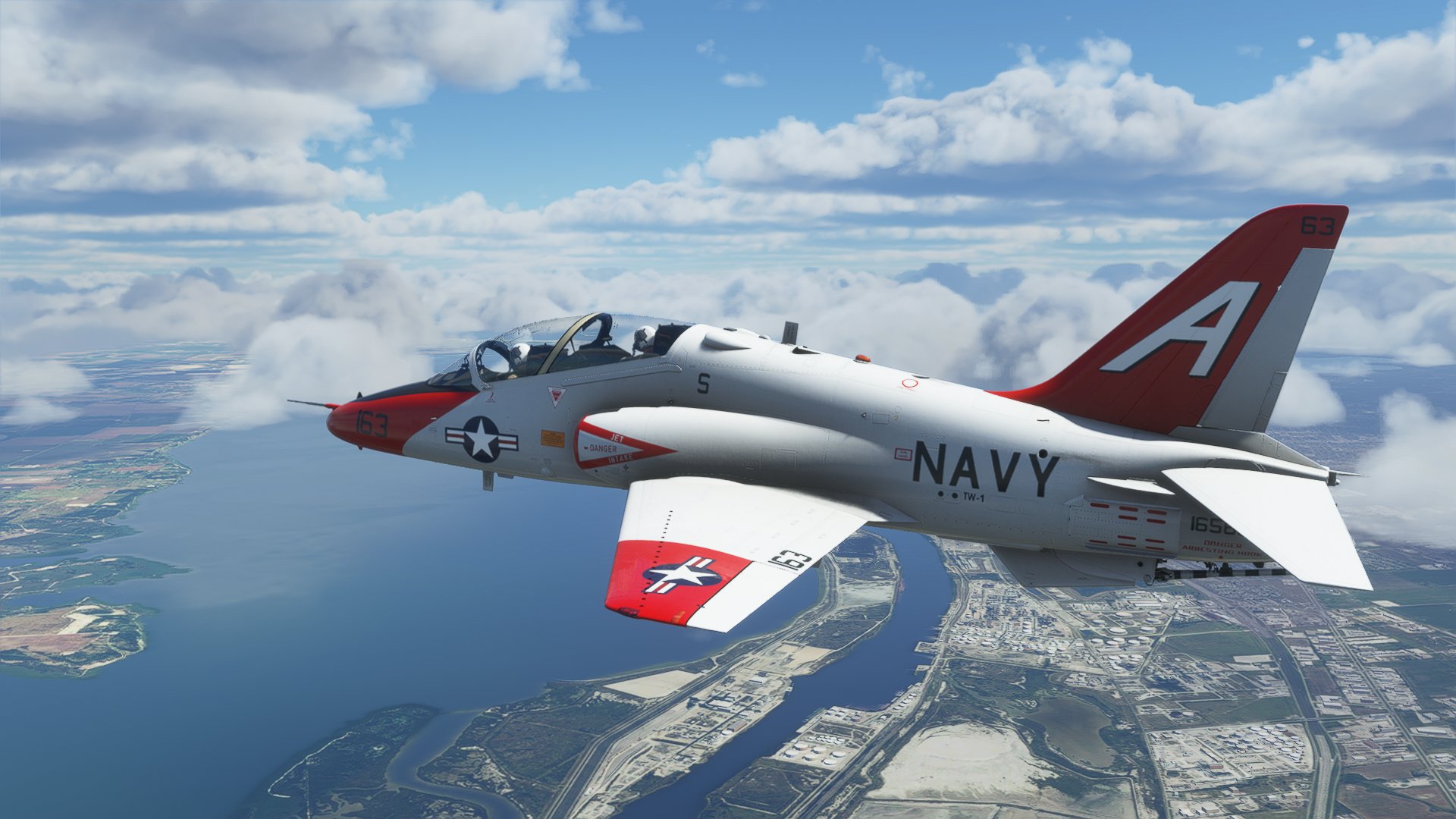
T-45C Goshawk for Microsoft Flight Simulator - version 1.00


The T-45C Goshawk for Microsoft Flight Simulator is now available for purchase! The package is available here:

MilViz Store: IndiaFoxtEcho - MilViz T45C Goshawk for MSFS2020

Orbx (through Orbx Direct): T-45 Goshawk - Orbx (orbxdirect.com)

SimMarket: simMarket: INDIAFOXTECHO - T-45C GOSHAWK - MSFS

...and should be available soon on the Microsoft in-game marketplace.

FREQUENTLY ASKED QUESTIONS:

- none at the moment -

POST RELEASE BUGS / CHANGE REQUESTS:

T45CPR001 - one flood light pokes through the fuselage at night on the starboard side of the aicraft. Already fixed in version 1.01 for Microsoft.
T45CPR002 - check functionality of ILS CDI/GS bars in the ADI page
T45CPR003 - nav light bug introduced by SimUpdate III - effects switch off while switching external/internal build (already solved in v1.01 for Microsoft)
T45CPR004 -  if not retracted manually, launch bar may protrude out of the fusalage.
T45CPR005 - weather occlusion does not seem to work... may be was disabled in the final build?
T45CPR006 - formation light switch INOP
T45CPR007 - several users complained about the in-game external sounds
T45CPR008 - poor performance on some systems, idea is to provide a "lite" version

Tuesday, August 25, 2020

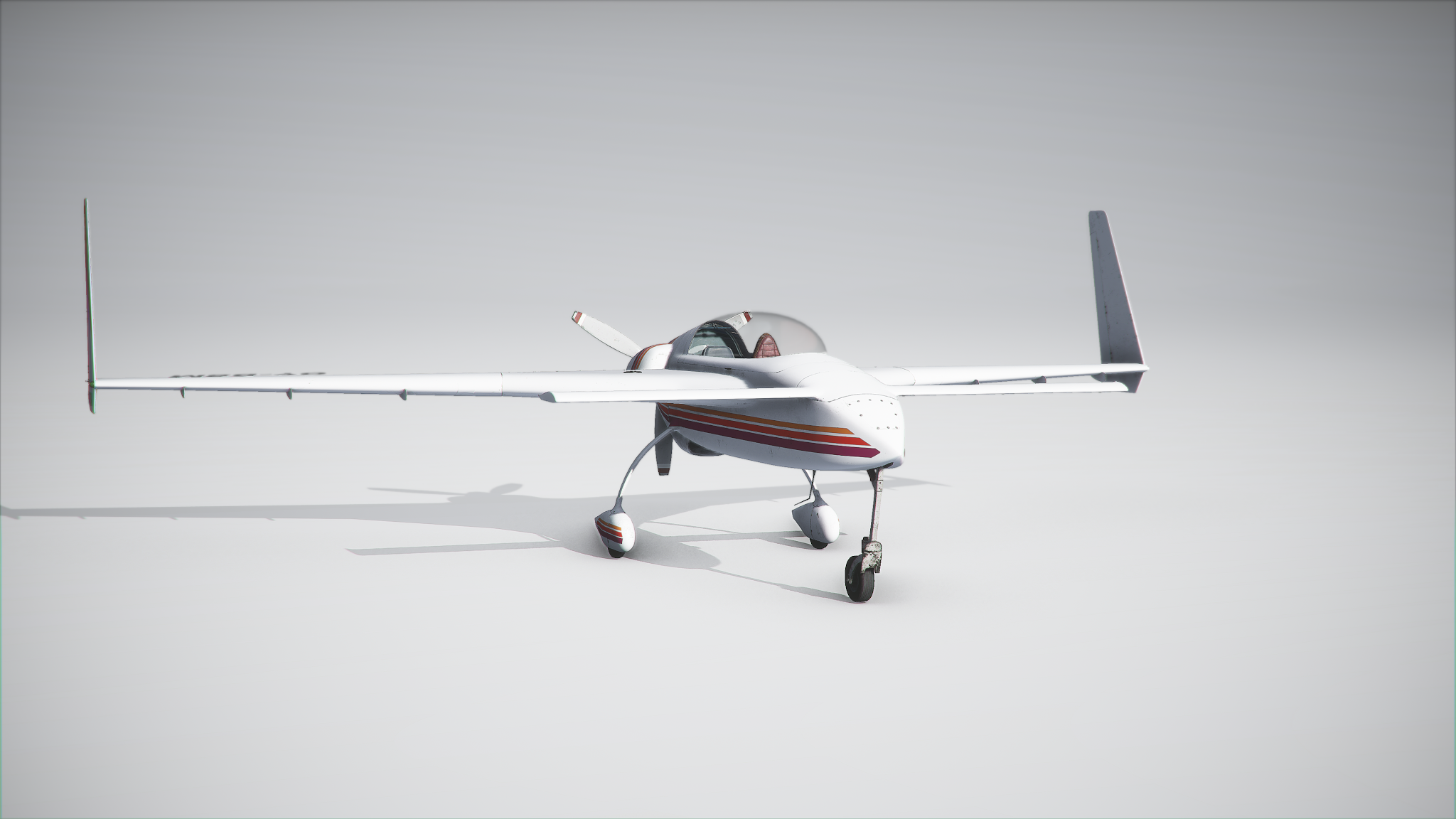
Long-EZ for Microsoft Flight Simulator Beta Testing


BETA 1 of the Long-EZ Project for Microsoft Flight Simulator is here! 

BETA TEST ACCESS INSTRUCTIONS

ALL BETA TEST SLOTS ARE TAKEN - NO FURTHER APPLICATIONS WILL BE ACCEPTED...SORRY!

DESIGN INTENT:

This is a very simple aircraft package intended for VFR operations only. The planes is easy to fly an accessible to simmers of any experience level.

BETA VERSION INSTALLATION INSTRUCTIONS:

Add-ons for Microsoft Flight Simulator are distributed as packages. Packages shall be placed in the "Community" folder. You will need to restart MSFS if the simulator was running when you have moved the files.

HOW TO REPORT BUGS:

The preferred way to report bugs is to add a comment to this post, specifying what is the experienced malfunction and when it happens. Pics are welcome.
Alternatively, an email is good to. Comments are preferred so that other users can see them.
It is not a race, so take your time. The simulation is quite complex, so it may take some time to get acquainted with the plane… I'd suggest you log at least a couple of hours before submitting any feedback.
Also, PLEASE, before posting a bug make sure it is not already in the list below.

COLOR KEY

Red - Higher priority: a severe bug that may hamper the usage of the aircraft
Yellow - Lower priority: definitely a defect, but not a high priority to solve it
Green - Problem solved, o mitigated to the level that it is acceptable.Dark Green - Problem solved or mitigated before the Beta 1 release.
Blue - Comment, nice-to-have features or suggestions


CHANGE REQUEST LOG AND TO-DO LIST
Last changed by Dino on 07/09/2020

EXTERNAL MODEL

LEZEXT001- Add wing-flex animation
LEZEXT002 - Crew not visibile - FIXED in Beta 2 build
LEZEXT003 - Nose gear steer animation direction is reversed - FIXED in Beta 3 build
LEZEXT004 - Aileron movement reversed - FIXED in Beta 3 build
LEXEXT005 - Rudders only move outwards - FIXED in Beta 3 build
LEXEXT006 - White/Blue texture still has the AO for the tanks - FIXED in Beta 3 build
LEXEXT007 - Registration numbers floating above/below wings - FIXED (at least partially) in RC1 build

VIRTUAL COCKPIT

LEZVC001 - Incorrect caption on magnetos/starter key... - FIXED in Beta 3
LEZVC002 - Incorrect animation of directional gyro (moves the other way around) - FIXED in Beta 2 build
LEZVC003 - Temperature and Pressure needles missing from Beta build - FIXED in Beta 3 build
LEZVC004 - No colour-coding arc on ASI - FIXED in Beta 3 build
LEZVC005 - "Steer Angle" caption displayed when mouse is over T&P gauge - remove caption from model behavior - Fixed in Beta 2 build
LEZVC006 - Request to animate COMM box knob animaton 
LEZVC007 - Compass indications incorrect - FIXED in Beta 3 build
LEZVC008 - Gear lever should be a crank - FIXED in Beta 3 build
LEZVC009 - Rudder pedals not visible - FIXED in Beta 3 build
LEZVC010 - Request to add fuel selecto - NOTE, this would require reworking the fuel gauge too. - FIXED in Beta 3 build
LEZVC011 - Scratches and marks compelely gone from Beta 3 - FIXED in RC1, transparency was way too high
LEZVC012 - Legs of the passenger peek though the seat - REMOVED passenger figure in RC1 (it was cool...but model is too large).
LEZVC013 - Poor visibility during landing - CHANGED viewpoint in RC1 (raised by 0.5cm)
LEZVC014 - Difficult to actuate Mixture levers... probably due to MSFS engine.
LEZVC015 - Canopy OPEN/CLOSE tip (remove...old parameter, not used in MSFS)
LEZVC016 - Flickering ICE animation in VC - probably due to visual inteference with outer glass - Fixed by removing outer glass geometry
LEZVC017 - Fuel knob not switching in the right order: NOTE, this is due to legacy animations.
 

FLIGHT MODEL

LEZFM001 - (was LEZMISC003) Engine RPM Indications are way off in several conditions. Vastly improved in Beta 3.
LEZFM002 - Too easy to spin the aicraft
LEZFM003 - Aircraft should steer through toe brakes only - NOTE, NWS was added intentionally for gameplay purposes.
LEZFM004 - Climb performance is a somewhat optimistic.
LEZFM005 - Increase speedbrake effectiveness - INCREASED in Beta 3 build.
LEZFM006 - Increase landing gear drag - significantly increased in RC1 build

OTHER

LEZMISC001 - Add interactive checklist
LEZMISC002 - Add sound package compiled to the new MSFS (currently using a default FSX package)
LEZMISC003 - Engine RPM Indications are way off in several conditions - wrong category, re-logged as LEZFM001
LEZMISC004 - COG limits incorrect
LEZMISC005 - Fire effect misplaced. It should not have been implemented btw.
LEZMISC007 - Strobe lights do not react to strobe light switch (but react to light master)

Wednesday, June 3, 2020

PROJECTS ROADMAP UPDATE - JUNE 2020


As the M-346 is approaching the public release, I thought it was time to share my current plans.
This is basically what I have on my hard-disk...in no particular order. Completion of the projects will depend on a number of factors.

The general plan is as follows:

- Lead platform: for the time being, the lead platform is still Prepar3D V4.4 / v4.5 /v5.0. The lead platform may change in future. The general idea, however, is to pick the best platform for each project depending on where it will be possibile to create the best product.

- Microsoft Flight Simulator: the plan is to support the new Microsoft Flight Simulator, initially by converting the planes we thing are most fit for conversion and with proper quality.

- X-Plane 11. Still some work going on with XP-11...mostly conversion of existing projects.

- Other platforms: we are actively working on partnerships and cooperations.


F-35 LIGHTNING II - VERSION 4.00 for MSFS / P3Dv5

The general idea is to have a new baseline of the F-35 project, rebuilt to comply with MSFS standard.
At the moment, however, STOVL capabilities in MSFS are unclear… so the project is limited to the F-35A for the time being.
PROJECT STATUS: PRELIMINARY WORK


TA-4J FOR X-PLANE 11

The conversion is almost complete...it just needs some minor tweaks to the flight model and avionics before moving to the Beta stage.
PROJECT STATUS: ALPHA BUILD COMPLETE


MC.72 for MSFS / P3Dv5 (and XP-11 maybe?)

The Macchi Castoldi MC.72 is established the world speed record in 1934, and held it until 1939 and is still, to date, the fastest piston seaplane ever built. I thought it would be fun to have one in the sim.
PROJECT STATUS: PRELIMINARY 3D MODELING


F-14D SUPER TOMCAT REBUILD for MSFS/P3Dv5

The idea here would be to rebuild from scrathc my F-14D Tomcat. Given the high quality of the F-14B in DCS, the interest on this project may not be great. Still it is looking cool.
PROJECT STATUS: ON HOLD - PRELIMINARY 3D MODELING COMPLETE - NOT ENOUGH RESOURCES AT THE MOMENT.


BOEING T-X for MSFS/P3Dv5
I quite like this plane...but at the moment the infomation on the cockpit and the avionics is scarce. Waiting for more info.
PROJECT STATUS: ON HOLD - AWATING MORE INFORMATION


BOEING MQ-25 STINGRAY for MSFS/P3Dv5
This started as an experiment to make a naval drone. Looking good and seems a great complement to the F-35 in some scenarios.
PROJECT STATUS: 3D MODELING COMPLETE - NOT ENOUGH RESOURCES FOR THE MOMENT


BOEING T-45 GOSHAWK for MSFS/P3Dv5
I had started a remake of the Goshawk project… but there may be competing products in development...so no further progress has been done.
PROJECT STATUS: ON HOLD - POTENTIAL CANCELLATION


M-345 for MSFS/P3Dv5
There is now some information available on the new M-345 trainer...and it would be cool to transform the M-345 prototype in the M-345 production model.
PROJECT STATUS: ON HOLD - DOCUMENTATION REVIEW


Wednesday, June 12, 2019

Flight Simulator is coming back!

You have heard the big news of these days for us simmers…. FLIGHT SIMULATOR IS COMING BACK!!!!!
There is plenty to be excited about, as the trailer was fantastic… but I see a lot of overly optimistic expectations which, I am afraid, will lead to some disappointment.
As any flightsim enthusiast, I went through the trailer several times to squeeze every bit of information from it… but this new Flight Simulator has been a well kept secret and none of the flight simulator developers I know has been involved or consulted for this project.


So, here is what we know for sure:


  • This new simulator is called simply "Flight Simulator"


  • It will be available for both XBox and PC (most probably through Microsoft's digital download platform, possibly enabling you to use it both on the Xbox and PC with a single licence)

  • It will be included in Microsoft "Game Pass" service

  • It will feature a number of different planes from small seaplanes to airliners

  • It will allow you to fly anywhere in the world


What we do not know:


  • If it will run on XBox "Scarlet" (my guess: yes, sooner or later)

  • If it will have an SDK and allow content from third parties (my guess: not on Xbox - the console version will at least have some form of moderation from Microsoft)

  • Be backward compatible with FSX addons (my guess: no, and it is a good thing)

  • How powerful your hardware needs to be to run the sim at a reasonable speed


What I hope:


  • Microsoft hopefully learned the lessons from Flight and Flight Simulator World

  • Microsoft will allow us developers to continue producing and selling add-ons as we did in the past

  • Microsoft will provide some sort of backward compatibility for the code and flight models (note that, unknown to many, this was planned in quite a smart way in FSW by providing a compiler for XML gauges)

  • Microsoft hopefully got some hint from the latest versions of P3D (which introduce a number of great features) and X-Plane 


And now… a quick look at some screenshots with my comments (and my guesses...for what matters): 


Very nice sky rendering (possibly implementing the "True Sky" technology, which was used by both FSW and Ace Combat)! But look closely on the lower right corner, and you see that a scenery discontinuity slipped through the trailer. The tile seems unrelated to the scenery, and looks a lot when I max out P3D and runs out of video memory. Aside, in this shot it is difficult to tell if the image is generated by a very smart landclass system or it is photoreal...but if it is photoreal, the resolution is pretty low. May be there is a "lower res" photoreal Earth model? I don't know.

Definitely a photoreal shot. Buildings are unique and fit perfectly to the scenery… and look a lot as the ones in Google Earth 3D. It is totally unrealistic to think that the simulator will look as good and detailed everywhere in the world… this would require several Terabytes of data. However, is not unthinkable that the sim comes with a number of high detail areas and *MAYBE* streams sceneries from a server, much like Google Earth 3D. This may or may not require a subscription…BUT THIS IS JUST A WILD GUESS. 

Wether it True Sky or not it looks great… the sea in this shot is less impressive, and so is the fog. But still an awesome shot.

Yeah!!!! Hangar enviroment with ground crew! And real time raytracing!
...all cool and dandy, but: we have no clue if all hangars will look like this (most probably not - for all we know this may be just an aicraft selection menu) and while the rendering engine looks cool, similar results can be achieved with a PBR engine. So neither the hangar nor raytracing are confirmed IMHO.

Another impressive shot of the sky. Looks awesome! The scenery however is not hugely better than the best addons we have.

I've seen people commenting that this new Flight Simulator has the best plane models ever… and I agree they are really good. Better than the best add-ons around? I do not believe so - the difference is in the rendering engine, which frankly seems the best around in terms of quality.

Very good light contrast. Both X-Plane and (to a lesser extent) P3D fail, IMHO, in rendering the HDR contrast between the external world and the cockpit. DCS and AFS2 do a better job in that respect… but it seems that this new Flight Simulator will be the best in class in this respect.  

Ground vehicles and crew! It will have awesome airports and detailed ground services!
...well, we'll see. Sure this one looks good, and the assets look great. But we'll see how interactive the airport will be and how good the average airport will look. My guess is that only major airports around the world will look this good.  

This shot is interesting for two reasons: it shows what the engine is capable of doing for sky and cloud rendering (very menacing weather...do not fly there!) but most importantly it shows what I believe will be a "regular" airport. Does not look bad at all. 

Giraffes, elephants and flamingos! This reminds me of the "living world" thing when FSX launched… may be there will be animals in the wild as we were promised ten years ago, maybe they will be "mission objects" like they were in FSX. However they look pretty good. Will we get autogen grass?

This seems another photoreal area…medium-high res. Looks good, but not much beyond what we already have. What I do not understand is how such big chunks of photoreal scenery will fit into the installation. Surely the sim will not have the whole world at this resolution upon install...may be you can pick some specific areas and download a higher res version of them, or maybe it will stream the scenery from a server. Or maybe they only showed us the good bits. 

Impressive rain effect on the cockpit and excellent weather rendering.

Night lighting looks excellent - it looks superior to XP11, which is quite a feat as I consider XP11 night lighting to be excellent.

The flamingos! Again, not sure if you will be able to see wildlife around the world.. for all we know, these may be mission object - and by the way, if they will pack some good missions with the sim I'll be very pleased: I loved FSX missions!
Aside, water looks pretty cool in this shot - and flamingos have their own shadow.

Great rendition of the pyramids: good job! Hopefully there will be several places around the world with this level of detail.

The lighting on the plane looks great (but again...nothing that cannot be achieved with a good PBR implementation)… but the ground texture? Does not look great.

San Francisco looks wonderful...and looks like the Icon A5 is back from Flight ;-) !

The presence of the TBM-900 is pretty great...may be a sign of much needed diversity in aircraft models.


Some final random thoughts:

Graphically looks great. The engine is good and the 3D assets look top-quality. There seems to be a tremendous amount of content that only a big corporate with high-end videogame technology as Microsoft could deliver (no offense to Lockheed Martin or Laminar Research).

I've seen people afraid that, since it will be also on XBox, it will be dumbed down (for those "stupid gamers")… like if recreational flight simming is a serious thing ;-) ! But no, I do not think it will be the case. Much like you could play most of the FSX missions with an XBox controller, here you will be able to fly around and play mission with one. So, it will be like FSX.

The big question is… will it support third parties and smaller developers like me? Maybe. Or maybe not. From what I have seen so far, Microsoft has learned a lot from the Flight fiasco...but never underestimate the capability of a large corporate to make stupid decision when they see a potential for a business model they like. And the current ruling business model in entertainment is "subscription" (rather than DLC).
In any case, I am pretty sure that, even if third parties will be allowed to sell their stuff, the content on the Microsoft Platform will be moderated - for a number of legal reasons.
This may kill smaller developers like me... but we'll see.

Flight Simulator may kill P3D "home" market (which is not supposed to exist but it does) and may push P3D in its own niche of education/serious simulation - I would not be surprised if LM starts to enforce some strict controls on the licences in future. We'll see what P3Dv5 will have to offer, but I believe this announcement weakens P3D position a little.

On the other hand, if Microsoft screws up for the simmers, Flight Simulator may actually mean a larger audience for XP11...as disappointed simmers may jump to that platform.

Time will tell… for the moment, let's enjoy the simulators we have: it will take some time before we get our hands on this new Flight Simulator.