Showing posts with label Beta Testing. Show all posts

Saturday, September 26, 2020

Aermacchi MB-339A for Microsoft Flight Simulator - BETA TEST


BETA TEST ACCESS INSTRUCTIONS

************ DUE TO THE LARGE NUMBER OF APPLICATIONS RECEIVED BETA TEST APPLICATIONS ARE SUSPENDED - INVITATIONS TO THE FIRST 30 SELECTED TESTERS HAVE BEEN SENT *************


Beta test is open to testers of all different skill levels and expertise.
In order to apply for the Beta Test, please drop an email to indiafoxtecho@gmail.com with the following information:
- System specification (no need of details or long explainations: just specify your CPU, Clock speed, RAM, GPU and dedicated video RAM)
- Real world flight experience (if any) - please keep it short!
- Simulation experience - please keep it short!
- Any special tie to the MB-339 or any reason why you really want to test this plane

Important! Subject of the email must be "MB339 MSFS Beta Test Application".

Please do not apply unless you have 4-5 hours to dedicate to test this aircraft!
Testing this aircraft is NOT a paid position in any way...if you do it, you do it only for the fun of it!

...and, due to the large number of applications we typically receive, we cannot grant a reply to everybody. If you do not receive a reply in a week or so, please assume you have not been admitted to the Beta - apologies in advance! 

DESIGN INTENT:

This is a medium complexity add-on which is meant to depict the Aermacchi MB-339 of the Frecce Tricolori in a detailed but accessible way. The key points of the package are as follows:
- Focus of the simulation is the Aermacchi MB-339PAN/MLU version. Visual variant for MB-339A/MLU is also provided
- Highly detailed external and internal model
- Flight model and systems simulation is based on default MSFS functionalities (no external code)
- Simple sound package 

The plane is intended for basic military jet training, formation flying and aerobatics.

BETA VERSION INSTALLATION INSTRUCTIONS:

Add-ons for Microsoft Flight Simulator are distributed as packages. Packages shall be placed in the "Community" folder. You will need to restart MSFS if the simulator was running when you have moved the files.

HOW TO REPORT BUGS:

The preferred way to report bugs is to add a comment to this post, specifying what is the experienced malfunction and when it happens. Pics are welcome.
PLEASE do not rush in reporting bugs - it is not a race - take your time and verify if it is a real problem and, if you think it is, try to understand when it happens exactly.
Alternatively, an email is good to. Comments are preferred so that other users can see them.
It is not a race, so take your time. The simulation is quite complex, so it may take some time to get acquainted with the plane… I'd suggest you log at least a couple of hours before submitting any feedback.
Also, PLEASE, before posting a bug make sure it is not already in the list below.

COLOR KEY:

Red - Higher priority: a severe bug that may hamper the usage of the aircraft
Yellow - Lower priority: definitely a defect, but not a high priority to solve it
Green - Problem solved, o mitigated to the level that it is acceptable.Dark Green - Problem solved or mitigated before the Beta 1 release.
Blue - Comment, nice-to-have features or suggestions

CHANGE REQUEST LOG AND TO-DO LIST

Current tester version BETA 1 - Released on 28/09/2020
Current internal build BETA 2 WIP 

Current metrics:

Red items: 0
Yellow items: 11
Green items: 41
Blue items: 1  
TOTAL CRs: 52
Progress toward release 78% :-(

Last changed by Dino on 10/10/2020

EXTERNAL MODEL:

There are two external models in the package. The star of the show, and default selection, is the MB-339PAN/MLU with standard loadout for the Frecce Tricolori Airshow. As visual alternative, a model for MB-339A (non MLU) with elliptical tiptanks is also provided. Externally MLU and non-MLU differ mostly for the fact that MLU has formation lights and some of the antennas are in different positions.
The two external models are separate files and should be tested separately - if you find a problem, please check if it is present in one or both models. 

MB339EXT001 - Better heat blur effect - slightly improved in Beta 2 (still somewhat small, but now aligned to the aircraft direction)...
MB339EXT002 - Missing Ice Blast effect - added ice blast effect
MB339EXT003 - Check beacon light on fuselage (visible only from below)? - FIXED in Beta 2
MB339EXT004 - Flood lights peek slightly through external views... FIXED in Beta 2
MB339EXT005 - Missing Landing Light animation from external model... FIXED in Beta 2

VIRTUAL COCKPIT:

As for the external model, two separate virtual cockpit models are included: PAN and A versions. Unlike the external models, both internal models include MLU changes. The PAN version differs from the A version since it lacks the gunsight but has smoke indicators and smoke control panel.

MB339VC001 - Throttle lever movement incorrect and should have STOP position - Fixed
MB339VC002 - GPS Display incomplete
MB339VC003 - MASTER CAUTION cannot be snoozed - Fixed
MB339VC004 - Caution panel incomplete (add at least JPT LIMIT and AIL SERVO) - FIXED in Beta2
MB339VC005 - Backlighting of main panel cannot be turned off
MB339VC006 - RNAV HSI mode to be checked
MB339VC007 - RNAV ADI mode to be checked
MB339VC008 - Control shift selectors always lit - FIXED in Beta2
MB339VC009 - Radio system not working? TO BE CHECKED, IT SHOULD WORK! - Checked: radio system seems to work as advertised, but mouse area is small. It is possible to use it with the mouse wheel, while dragging is somewhat cumbersome.
MB339VC010 - Transponder system not working? TO BE CHECKED IT SHOULD WORK! - Checked: radio system seems to work as advertised, but mouse area is small. It is possible to use it with the mouse wheel, while dragging is somewhat cumbersome.
MB339VC011 - Fuel total selector not working....not meant to work either, but still... - FIXED in Beta2
MB339VC012 - Fuel digital display not working - missing to be added - FIXED in Beta2
MB339VC013 - Trim buttons do not work - CHECKED versus flight manual: these are advisory lights only, cannot be pushed.
MB339VC014 - VOR needles on HSI are OK on ILS, but seem reversed in normal VOR operation (to be checked) - NOTE, initial check seems to be OK...maybe tester had the aircraft symbol reversed? If flying to TO station and heading towards bearing pointer 1, if aircraft symbol is upward behavior seems correct... further testing planned. BEHAVIOR SEEMS CORRECT
MB339VC015 - Unintended garbage geometry when canopy is open - FIXED for Beta 2
MB339VC016 - Would be nice to add ajustable formation lights
MB339VC017 - GEN1 and GEN2 weird glare - seems OK now, but in reality the bug was somewhat unclear...
MB339VC018 - Nav light selector should only select ON/OFF (bright/dim not selectable) - FIXED
MB339VC019 - Glitch in Transponder animation (some numbers not animated correctly) - FIXED for Beta 2
MB339VC020 - Electrical system: some systems are working even if battery is off provided that GEN 1 / GEN 2 are off even if engine was not running (hence electrical power shouldn't be available)... Issue likely due to Electrical Power availability variable...Should be fixed on Beta2... 
MB339VC021 - Toe brakes animation missing - FIXED for Beta 2
MB339VC022 - COM2 cannot be changed from cold and dark?
MB339VC023 - Speedbrake lever animation missing - FIXED for Beta 2
MB339VC024 - Request to animate the trim hat switch - FIXED for Beta 2 (although only for elevator)
MB339VC025 - Suggestion to remove the mouse tooltips for some controls, as they are done according to FSX/P3D conversion which is different from Asobo convention.
MB339VC026 - AOA frozen in icing condition even if anti-ice is on...
MB339VC027 - Digit "3" in altimeter shows too soon - FIXED for Beta 2
MB339VC028 - blinking glass in gunsight rendering - FIXED for Beta 2
MB339VC029 - AoA needle shows incorrect values - FIXED for Beta 2
MB339VC030 - Armament panel setting to be revised - FIXED for Beta 2
MB339VC031 - Fix Ail Servo and JPT limiter starting conditions - FIXED for Beta 2
MB339VC032 - Oxy Flow Switch incorrect position -. FIXED for Beta 2
MB339VC033 - GPS switches to be fixed according to new GPS Code - FIXED for Beta 2
MB339VC034 - Anti-Skid switch animation / light reversed - FIXED for Beta 2
MB339VC035 - Avionic master radio knob control does not work
MB339VC036 - Improve mirror rendering - FIXED for Beta 2
MB339VC037 - OMI Markers not working
MB339VC038 - Some lights are not visible in the VC - Fixed

FLIGHT MODEL:

The flight model has been tuned to mimic the performance of the MB-339PAN with airshow loadout. In this configuration the aircraft is somewhat slower than what most people think - achieving 350-370 knots maxium depeding on different factors.
The fuel capacity is limited to internal tanks only, irrespective of the external model.
NOTE: The aircraft should be able to fly all the formation maneuovres of the Frecce Tricolori programme, but is currently unable to replicate some parts of the solo programme.

MB339FM001 - Check center of gravity and COG limits - Revised in Beta 2
MB339FM002 - Max altitude about 30000ft (should be 45000+) - Engine performance vs altitude fixed in Beta 2
MB339FM003 - No stall? - Revised stall behavior for Beta 2
MB339FM004 - Aircarft too sensitive to NWS during takeoff run
MB339FM005 - Rudder effectiveness is excessive?
MB339FM006 - Request to implement external and wingtip fuel tanks
MB339FM007 - Landing AoA is incorrect

OTHER:

Due to MSFS limitations, the smoke system is NOT WORKING - although controls in the cockpit do work.
The sound system is using FSX legacy mode - hence some sound effects (e.g.rain sounds) are NOT supported.

MB339OT001 - Rework view order for those who do not use free look mode (apparently left and right instrument views are inverted) - FIXED in Beta 2
MB339OT002 - Review startup conditions
MB339OT003 - One user requested wider view angles for both landing and instrument views

Tuesday, August 25, 2020

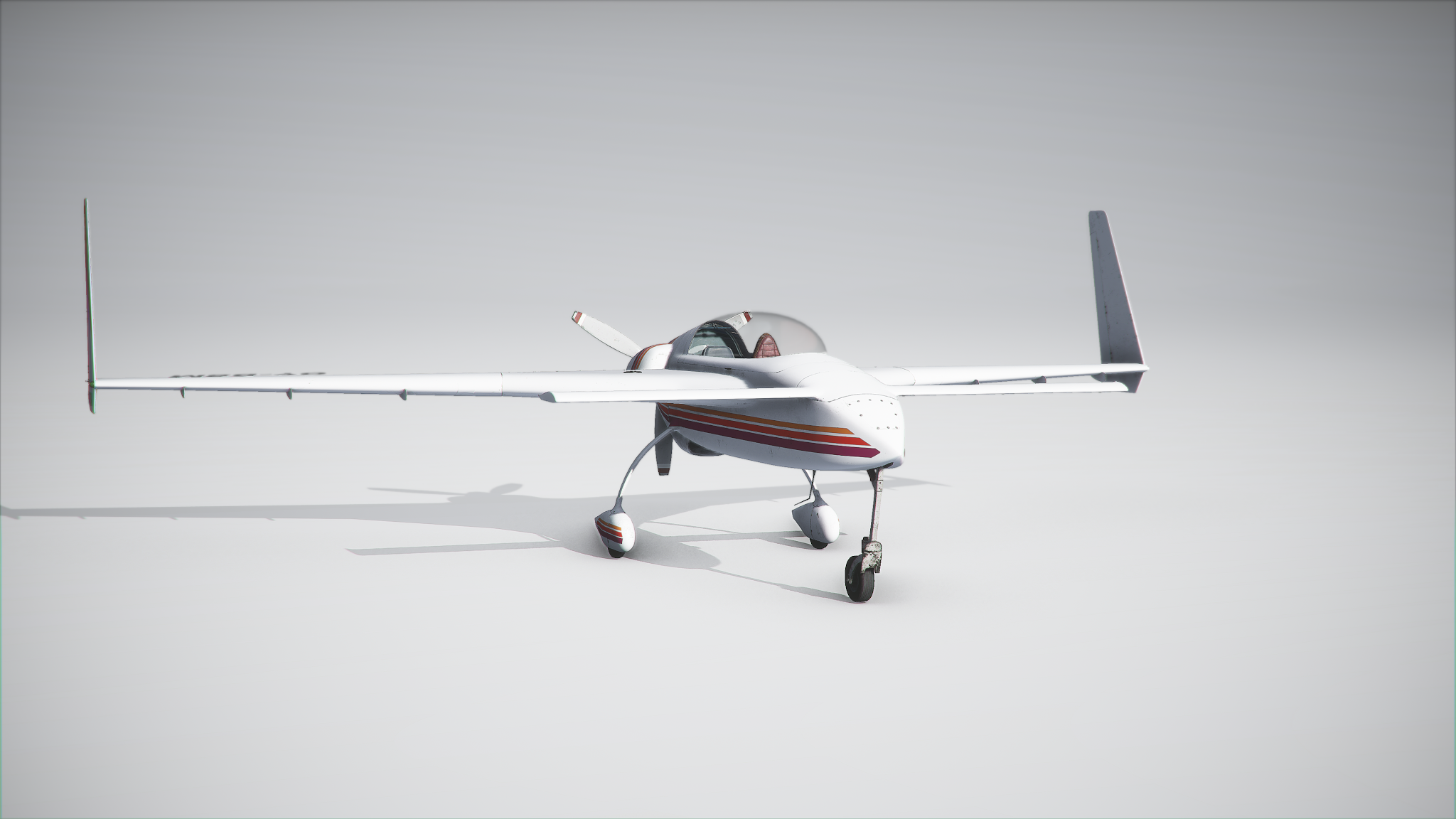
Long-EZ for Microsoft Flight Simulator Beta Testing


BETA 1 of the Long-EZ Project for Microsoft Flight Simulator is here! 

BETA TEST ACCESS INSTRUCTIONS

ALL BETA TEST SLOTS ARE TAKEN - NO FURTHER APPLICATIONS WILL BE ACCEPTED...SORRY!

DESIGN INTENT:

This is a very simple aircraft package intended for VFR operations only. The planes is easy to fly an accessible to simmers of any experience level.

BETA VERSION INSTALLATION INSTRUCTIONS:

Add-ons for Microsoft Flight Simulator are distributed as packages. Packages shall be placed in the "Community" folder. You will need to restart MSFS if the simulator was running when you have moved the files.

HOW TO REPORT BUGS:

The preferred way to report bugs is to add a comment to this post, specifying what is the experienced malfunction and when it happens. Pics are welcome.
Alternatively, an email is good to. Comments are preferred so that other users can see them.
It is not a race, so take your time. The simulation is quite complex, so it may take some time to get acquainted with the plane… I'd suggest you log at least a couple of hours before submitting any feedback.
Also, PLEASE, before posting a bug make sure it is not already in the list below.

COLOR KEY

Red - Higher priority: a severe bug that may hamper the usage of the aircraft
Yellow - Lower priority: definitely a defect, but not a high priority to solve it
Green - Problem solved, o mitigated to the level that it is acceptable.Dark Green - Problem solved or mitigated before the Beta 1 release.
Blue - Comment, nice-to-have features or suggestions


CHANGE REQUEST LOG AND TO-DO LIST
Last changed by Dino on 07/09/2020

EXTERNAL MODEL

LEZEXT001- Add wing-flex animation
LEZEXT002 - Crew not visibile - FIXED in Beta 2 build
LEZEXT003 - Nose gear steer animation direction is reversed - FIXED in Beta 3 build
LEZEXT004 - Aileron movement reversed - FIXED in Beta 3 build
LEXEXT005 - Rudders only move outwards - FIXED in Beta 3 build
LEXEXT006 - White/Blue texture still has the AO for the tanks - FIXED in Beta 3 build
LEXEXT007 - Registration numbers floating above/below wings - FIXED (at least partially) in RC1 build

VIRTUAL COCKPIT

LEZVC001 - Incorrect caption on magnetos/starter key... - FIXED in Beta 3
LEZVC002 - Incorrect animation of directional gyro (moves the other way around) - FIXED in Beta 2 build
LEZVC003 - Temperature and Pressure needles missing from Beta build - FIXED in Beta 3 build
LEZVC004 - No colour-coding arc on ASI - FIXED in Beta 3 build
LEZVC005 - "Steer Angle" caption displayed when mouse is over T&P gauge - remove caption from model behavior - Fixed in Beta 2 build
LEZVC006 - Request to animate COMM box knob animaton 
LEZVC007 - Compass indications incorrect - FIXED in Beta 3 build
LEZVC008 - Gear lever should be a crank - FIXED in Beta 3 build
LEZVC009 - Rudder pedals not visible - FIXED in Beta 3 build
LEZVC010 - Request to add fuel selecto - NOTE, this would require reworking the fuel gauge too. - FIXED in Beta 3 build
LEZVC011 - Scratches and marks compelely gone from Beta 3 - FIXED in RC1, transparency was way too high
LEZVC012 - Legs of the passenger peek though the seat - REMOVED passenger figure in RC1 (it was cool...but model is too large).
LEZVC013 - Poor visibility during landing - CHANGED viewpoint in RC1 (raised by 0.5cm)
LEZVC014 - Difficult to actuate Mixture levers... probably due to MSFS engine.
LEZVC015 - Canopy OPEN/CLOSE tip (remove...old parameter, not used in MSFS)
LEZVC016 - Flickering ICE animation in VC - probably due to visual inteference with outer glass - Fixed by removing outer glass geometry
LEZVC017 - Fuel knob not switching in the right order: NOTE, this is due to legacy animations.
 

FLIGHT MODEL

LEZFM001 - (was LEZMISC003) Engine RPM Indications are way off in several conditions. Vastly improved in Beta 3.
LEZFM002 - Too easy to spin the aicraft
LEZFM003 - Aircraft should steer through toe brakes only - NOTE, NWS was added intentionally for gameplay purposes.
LEZFM004 - Climb performance is a somewhat optimistic.
LEZFM005 - Increase speedbrake effectiveness - INCREASED in Beta 3 build.
LEZFM006 - Increase landing gear drag - significantly increased in RC1 build

OTHER

LEZMISC001 - Add interactive checklist
LEZMISC002 - Add sound package compiled to the new MSFS (currently using a default FSX package)
LEZMISC003 - Engine RPM Indications are way off in several conditions - wrong category, re-logged as LEZFM001
LEZMISC004 - COG limits incorrect
LEZMISC005 - Fire effect misplaced. It should not have been implemented btw.
LEZMISC007 - Strobe lights do not react to strobe light switch (but react to light master)

Monday, April 20, 2020

M-346 MASTER Beta Test and To-do List


IMPORTANT! All Beta test slots have been assigned. NO NEW APPLICATIONS WILL BE ACCEPTED.

BETA 1 of the Aermacchi M-346 Project is finally here! The build is not really feature complete but it is completely flyable and ready for test.

BETA TEST ACCESS INSTRUCTIONS

To apply as a Beta tester for this project, please send me and email at indiafoxtecho@gmail.com with the following information:
- Real world and simulation experience (Note - Beta is open to ALL levels of experience...I ask the question just to know what is your level of aeronautical knowledge)
- Your system CPU, GPU, RAM and OS
- The simulator you intend to test the M-346 on (exact version of P3D, and if it is with or without VRSTP)
- Any special reason why you think you should get the Beta (be honest, no flattery please)

The subject of the email shall be: M-346 Beta Test Application

Please DO NOT apply if you do not think you have the time to test it (consider 3-4 hours minimum).
Also, just to make it clear, this is NOT a paid position - in any form. I will decide to provide or not complimentary copies to testers at the end of the Beta stage.

BETA VERSION INSTALLATION INSTRUCTIONS:

The package embraces the "Add-on" approach available in P3Dv4 or v5 - therefore package shall be installed in your Prepar3D Add-ons folder in your Documents folder.

AIRCRAFT OPERATION INSTRUCTIONS:

A WIP manual that includes operational checklists is available for download by clickling HERE. The checklists are close to the real world one, but have been (partially) amended to reflect changes in the simulation. Testers are encouraged to go through the checklists and report discrepancies.

The aicraft embraces a COLD AND DARK approach.
If you start your scenario on the ground, the aircraft will shut down all its systems forcing you to a full start.
While you are encouraged to follow the checklist and report any major inconsistency, AT MINIMUM, to start the aircraft you must follow these steps:

- BATTERY ON

- RIGHT GENERATOR ON

- LEFT GENERATOR ON

- APU MASTER/STOP PUSHBUTTON (left console, close to the MFD) -> PUSH (the APU START button lights up and shows "RDY")

- APU START PUSHBUTTON ->  PUSH (the caption becomes RUN and blinks, indicating that the APU is starting up...when the blinking stops the APU is running)

- RIGHT ENGINE MODE SELECTOR KNOB -> Set to START/IDLE (the START pushbutton illuminates)

- RIGHT ENGINE START -> PUSH (the button starts to blink, when the blinking stops it means that the engine is running and APU can be turned off).

- APU MASTER/STOP PUSHBUTTON -> PUSH (APU stops running)

- REPEAT START PROCEDURE FOR LEFT ENGINE

NOTE: To arm the ejection seats, you must remove the safety pin AND set the arm switch to ARM. The procedure must be repeated for both seats, unless the ejection sequence lever in the backseat has been set for solo flight.

NOTE: Checklist would request you to perform the EGI Alignment procedure...which is however entirely optional. Despite the IN/GPS page readings, navigation accuracy is not affected by the procedure, which has been included only for users who want to perform it.

WHAT IS *NOT* INCLUDED IN THE BETA:

The aircraft is fully flyable and should not have glaring omissions. However, at present, the following features are missing or incomplete.
- Electronic Warfare (note: in the real world, the vanilla and the FT versions do not have it...addition is planned for the FA version)
- HMD support (still TBD)
- Special Alert system
- Voice alert system (it's in there...but needs improvement)
- UFCP steering point, waypoint and flight plan management
- Pre-Planned A/S Targeting
- Targeting Pod

HOW TO REPORT BUGS:

The preferred way to report bugs is to add a comment to this post, specifying what is the experienced malfunction and when it happens. Pics are welcome.
Alternatively, an email is good to. Comments are preferred so that other users can see them.
It is not a race, so take your time. The simulation is quite complex, so it may take some time to get acquainted with the plane… I'd suggest you log at least a couple of hours before submitting any feedback.
Also, PLEASE, before posting a bug make sure it is not already in the list below.

COLOR KEY

Red - Higher priority: a severe bug that may hamper the usage of the aircraft
Yellow - Lower priority: definitely a defect, but not a high priority to solve it
Green - Problem solved, o mitigated to the level that it is acceptable.Dark Green - Problem solved or mitigated before the Beta 1 release.
Blue - Comment, nice-to-have features or suggestions


CHANGE REQUEST LOG AND TO-DO LIST

Latest build:  Beta1
Last modified: 16/05/2020

Total logged 178
Red items 0
Yellow items 14
Green items 159
Blue items 5
Progress towards release: 94%

EXTERNAL MODEL

M346EX01 - Pylon disappears when A/S ordnance is dropped - Fixed
M346EX02 - Singapore livery: incorrect color of fuel tank bottom - Fixed
M346EX03 - NAV lights too strong  - NOTE: This happens only on P3Dv5. P3Dv5 lights seem overexposed. Bug identified - missing new P3Dv5 parameters. NOTE - THIS ALSO APPLIES TO LANDING LIGHTS IN VC.
M346EX04 - Speedbrake actuator piston not always aligned stem. ANIMATION REDONE
M346EX05 - Smokewinders hung without rails in P3Dv5. Solved - same bug of M346OT16.
M346EX06 - Unintended INOP clickspots in external view
M346EX07 - Request to remove green tint from HUD (green tint was actually done on purpose for better contrast) - Green tint much less pronounced.
M346EX08 - Minor glitch in pilot animation - Fixed
M346EX09 - Veryfy dimensions and position of the pilot figures - Pilot figures approx 175cm tall, seem OK.
M346EX10 - Tweaked pilot figures animation for (slightly) better match with the controls.
M346EX11 - First stage compressor blades not animated.

M346EX12 - Landing lights too strong (P3Dv5 plaftorm problem) - Added custom light, much weaker than the default.


COCKPIT

M346VC01 - Warning system incomplete - Fully implemented
M346VC02 - Ejection Sequence Lever not implemented
M346VC03 - Autopilot Altitude Knob not working - Implemented
M346VC04 - UFCP Autopilot mode is missing - Implemented
M346VC05 - Oxygen System: Implemented
M346VC06 - STALL indication missing from ADI - Implemented
M346VC07 - ALIGNMENT indication missing from ADI - Added OPTIONAL EGI ALIGNMENT PROCEDURE
M346VC08 - FAIL TRAIN MODE not implemented
M346VC09 - Gear Lever Warning - Implemented
M346VC10 - FCR page rewritten according to flight manual - Done
M346VC11 - HSD format missing - Added simple HSD format mode
M346VC12 - Checklist format missing - Added CHECKLIST format
M346VC13 - TGP format graphics missing - ADDED
M346VC14 - MAX DECK MIN DECK indication from tactical pages.
M346VC15 - Caution system incomplete - Completed.
M346VC16 - CAWS Test Switch not implemented - Implemented
M346VC17 - Fixed incorrect AO in LMFD panel area - Fixed
M346VC18 - COM1 COM2 selector not working (but can be switched with volume keys)

M346VC19 - GPS DRIVES NAV1 linked to navigation mode - Implemented
M346VC20 - CLOCK/STOPWATCH UFCP mode implemented
M346VC21 - UFCP mode Flight Plan missing ADDED Simple FP ans SP modes, need documentation
M346VC22 - UFCP mode Waypoint missing - IMPLEMENTED: add and delete waypoint, and set as ground target
M346VC23 - UFCP mode BARO-RAD missing - IMPLEMENTED
M346VC24 - UFCP mode SBS missing - IMPLEMENTED
M346VC25 - Missing A/S symbology from HUD - ADDED
M346VC26 - Caption on severance command incorrect
M346VC27 - Caption on oxy system command incorrect
M346VC28 - MFD Power controls

M346VC29 - HSD FORMAT TO ACT AS SENSOR FUSION (Nice to have)
M346VC30 - Incorrect Left And Right Battery Discharge voice alert if Lgen or Rgen become inoperative - Modified code: alert will play only if battery voltage is critically low.
M346VC31 - Special Alert System Incomplete

M346VC32 - Test Light Switch Inop - Added
M346VC33 - Seat Firing Pins Not Present - Added

M346VC34 - SMS Store Acceptance Procedure Not Implemented - Implemented, also change and reload configuration can now be performed within the SMS screen.

M346VC35 - Missing labels from TAXI/LANDING Switch - FIXED

M346VC36 - TAXI/LANDING Switch works only for landing - FIXED

M346VC37 - Takeoff-trim button not working - Added
M346VC38 - Takeoff-trim indication on digital display needs to be revised - modified so that it does not show when autotrim is active

M346VC39 - Link TCT switches to relevant functions - FIXED
M346VC40 - L and R BLEED warning light should blink during aircraft power up.
M346VC41 - Check BATT warning lights - Now functional
M346VC42 - Cannot get out of EGI Alignment Procedure
M346VC43 - Persistent Battery Discharge Warning during APU start

M346VC44 - Improve HUD symbology visibility downward (should be at least 10 degrees) for correct visibility during landing -> FIXED FOR BETA 2
M346VC45 - HUD does not power up through Control+Shift+R Shortcut. FIXED
M346VC46 - Request to park FPM at the edge of the HUD FOV. - IMPLEMENTED, also added FPM LIMITED symbology

M346VC47 - Brightness of HUD considered not sufficient - To be checked.
M346VC48 - Altitude lock on CADI format is not centered (offset by 200ft approx). FIXED
M346VC49 - Check Autopilot symbology on glareshield - Confirmed to be correct
M346VC50 - Missing Autopilot symbology on CADI format - Fixed
M346VC51 - Flood lights way too strong in P3Dv5 HF1 - To be checked. Seems OK on my system. FIXED
M346VC52 - Graphic hole on the virtual cockpit (left kneeboard area) - FIXED
M346VC53 - MASTER CAUTION reset not working - MASTER CAUTION reset now silences all Caution and Warning except Special Messages
M346VC54 - Switch material not conveted to PBR - Fixed
M346VC55 - HUD - check position of clock - Checked Correct
M346VC56 - HUD - check speedbrake symbology - Fixed, added speedbrake symbology as per flight manual
M346VC57 - HUD - check speed dials - Checked correct as per Flight Manual
M346VC58 - HUD - check VOR/TACAN pointer - Added, only for VOR. Also fixed on Waterline (as opposed to following the FPM/CDM)
M346VC59 - HUD - request to add AoA caret - Added
M346VC60 - MASS Switch - rotates in the opposite direction. FIXED
M346VC61 - TRU unit missing from front cockpit. ADDED
M346VC62 - Digital displays are backlit when aicraft is powered off.
M346VC63 - Request to increase color coding contrast of TSD - Unselected items are now 40% darkerM346VC64 - VOR/ILS non selectable in TSD - Fixed
M346VC65 - Fuel pump switch INOP - Made it operable but has no real function in the sim

M346VC66 - MRK and TACAN knobs incorrectly animated - FIXED
M346VC67 - GPS Zero Switch and PTT switch incorrectly animated. - FIXED
M346VC68 - BLEED knob is off-center. on the OFF postion. - FIXED

M346VC69 - HUDR does not work during flight.

M346VC70 - Explosive cord missing smooth group - FIXED
M346VC71 - Canopy actuator is missing - Modeled, but not convincing… decided to leave it out.
M346VC72 - Rear cockpit PTT switch does not work
M346VC73 - Rear cockpit FCS Panel switches do not work
M346VC74 - Rear cockpit Audio Panel switches do not work - Fixed

M346VC75 - Landing Light animation missing - Fixed
M346VC76 - Rear Cockpit main panel switches not working

M346VC77 - Brake lever rotates during activation - 45 deg counterclockwise as per flight manual
M346VC78 - Emergency fire controls do not work in rear cockpit M346VC79 - Limit the stick visibility clickspot area - Fixed
M346VC80 - Harmonize Pan speed view in copilot cockpit
M346VC81 - Reduce HUD Graphic Area
M346VC82 - Introduce tinted glass for the HUD

M346VC83 - Check Alignment of A-A symbology on HUD
M346VC84 - Check Alignment of A-G symbology on HUD
M346VC85 - Add FPM to CADI
M346VC86 - Change SMS Page so that configuration must be accepted with MASS in standby
M346VC87 - Redone GHD Display to comply with the flight manual
M346VC88 - Master Caution does not flash in reality
M346VC89 - MENU pages are completely black and do not overlay on existing graphics.
M346VC90 - A/A and A/G modes are not selectable when Gear Down and WOW - Fixed
M346VC91 - Request to make REAL/SIM switch functional

M346VC92 - PARS not operative
M346VC93 - Alt SEL incorrectly labeled "right engine start switch" - Changed to autopilot altitude selector
M346VC94 - ICE warning appears at incorrect temperature - Changed logic to lower values

M346VC95 - FCS PAGE Wheel brake temp always displayed - FIXED

M346VC96 - CADI PAGE unnecessary digits in millibar indication - Fixed
M346VC97 - Misalignment between digits and altitude tape
M346VC98 - Truncated digits if more than 10 waypoints in flight plan, TSD and HSI pages. Fixed

M346VC99 - Incorrect HUD indication  above M1.00 Fixed
M346VC100 - Scenery leakage through cockpit model neardby left side of ejection seat - FIXED
M346VC101 - Altitude tape limited to 32000ft - Extended to 42000ft
M346VC102 - Cannot manually select waypoints from FP or TSD page - Fixed
M346VC103 - Zulu Time missing from TSD page - Fixed
M346VC104 - TCT switches EWS and TGP are incorrectly animated - FIXED (item renumbered due to mistake)
M346VC105 - Swapped VEH TSD control for NDB control

M346VC106 - Fix minor misalignment of Brightness and Audio Power Switches
M346VC107 - Implement APP mode in the HUD - Added CDI and Glideslope if VOR/ILS mode is detected and NAV mode is selected. Fixed on the waterline as opposed to follow the velocity vector.

M346VC108 - Implement FPM-CDM button in UFCP (order CDM, FPM, Waterline, CDM+FPM) - IMPLEMENTED
M346VC109 - Implement SP mode in UFCP - Simple SP Mode implemented
M346VC110 - Fixed bug preventing radio frequencies to be set correctly with new UFCP
M346VC111 - Fixed bug preventing TACAN channel to be set correctly with UFCP

M346VC112 - Implement HUD Declutter
M346VC113 - Add ARM caption to HUD
M346VC114 - Taxi light apparently can be switched on even if there is no electrical power
M346VC115 - Master Caution Reset does not work in rear cockpit

FLIGHT MODEL

M346FM01 - Disable Autotrim below 170 kts
M346FM02 - Roll rate too high (opinion of tester) - Checked against flight manual and confirmed by pilots.
M346FM03 - Idle power too high - Check engine performance
M346FM04 - Request to implement carefree handling

M346FM05 - Top speed too high - Check against flight envelope. NOTE: Official figures as follows:
0.87Mach at sea level, 1.0Mach at 20000ft. 1.15Mach max speed achieved during test flights, in slight dive. - Revised transonic drag coefficients

M346FM06 - Nosewheel steering insufficient. - Increased NWS angle and differential braking
M346FM07 - Park Brakes unable to stop the aircraft at high throttles
M346FM08 - Aircraft seems to move (very slowly) if park brake is engaged. 

M346FM09 - Aircraft engines can be started also in NORM mode in the real aircraft. - FIXED
M346FM10 - General feedback - slightly overpowered (5-10%?) - Revised drag coefficients
M346FM11 - Real world aircraft limit AoA is supposely 25 deg. NOTE: other sources indicate 30, 35 and 40 degrees al for limit AoA. NOTE: Flight manual clearly indicates that stall advisory is at 17° AOA. NOTE: Official figures seem to be as follows: STALL warning at 17° or 18° AoA depending on FCS mode. Real AoA limit: 25° deg. - Revised AOA limits

M346FM12 - Wheels not touching the runway (just few cm) on P3Dv5 - Revised contact points

M346FM13 - Oleo animations incorrect and do not match gear compression.

M346FM14 - Drag too low… difficult to decelerate the plane with throttles at idle. New drag index.
M346FM15 - Internal fuel tank capacity slightly different from real plane - FIXED
M346FM16 - EGT too low even at idle and on the ground
M346FM17 - NH at idel should be 56/57

M346FM18 - Basic empty weight does not include oil and hyraulic fuel. Should be 5300 - FIXED
M346FM19 - Change avionic reference speeds with EAS. - IMPLEMENTED


OTHER

M346OT01 - Cockpit animation is way too fast - slowed downa and added custom sound
M346OT02 - Sound package missing - Draft sound package implemented, needs refinements
M346OT03 - Air-to-Surface Tacpack functionality missing - Implemented
M346OT04 - Consider adding aural warnings 
M346OT05 - Laser code rejected by avionic system - Implemented
M346OT06 - TGP Laser Spot fine adjust not working - ADDED

M346OT07 - Add APU Sound - Added
M346OT08 - Pre-Planned target mode not implemented

M346OT09 - IFF Switch and Warning not Implemented - IFF requires user to power up the unit. Will report REPLY in green if the current L&S target is FRIEND
M346OT10 - Add a "ready to start the engines" button shortcut
M346OT11 - Turn GEN OFF for cold start
M346OT12 - Set EGI Alignment to COMPLETE if start is airborne

M346OT13 - HUD does not power up automatically via "ready to start" shortcut - Fixed initialization code in Beta 2.
M346OT14 - Keyboard shortcuts need to be revised/completed.
M346OT15 - Configurator. Rear pilot seems to reappear in the seat when aicraft is airborne. - Fixed code for Beta 2. Problem was a animation code snippet leftover from the Eurofighter.
M346OT16 - Configurator/SMS IRIS-T left underwing not connected to pylon (without Tacpack) - Fixed SMS code in Beta 2
M346OT17 - Configurator GBU-12 on pylon 2 non selectable. Right inner GBU-12 cannot be removed from the configurator (unless Clear All button is used). - Fixed configurator code in Beta 2
M346OT18 - Configurator BRD-4-250 on pylon 2 non selectable. Right inner BRD can only be removed from the configurator (unless Clear All button is used). - Fixed configurator code in Beta 2
M346OT19 - Configurator - Smokewinder left and right not connected to pylon without Tacpack - Fixed SMS code in Beta 2

M346OT20 -  Configurator - if chocks are not removed they stay on during motion and flight. Chocks and streamers will not disappear if aircraft is not stationary.
M346OT21 -  Configurator - if ladder is not removed, it stays on during motion and flight. Ladder will now disappear if aircraft is not stationary or if canopy is not open.

M346OT22 -  Sound system bug: crash due to missing sound files during certain conditions (engines out, engine or APU fire) - Fixed typos in sound DLL configuration.
M346OT23 - Check behavior of weapons release. FIXED - weapon selection from MFD did not include commands to SMS to select the proper pylon, hence did not work as intended.
M346OT24 - Replace stall sound

M346OT25 - Add 2D HUD display
M346OT26 - Add 2D MFD display for cockpit builders

M346OT27 - Add Taxi/Landing Light Shortcut

M346OT28 - Check selective Jettison functionality with Tacpack - Checked correct, but works only for certain stores
M346OT29 - Check emergency Jettison functionality with and without Tacpack - Checked correct

M346OT30 - Sign Tacpack files for multiplayer - Files signed

M346OT31 - Add information to the manual (e.g.HUD power switch)

M346OT32 - Replace STALL sound
M346OT33 - ADD BRD Functionality - ADDED THROUGH TACPACK


END OF LIST


Sunday, January 12, 2020

A-4E/F/G/H/K for Flight Simulator X


I finally have a "workable" Beta of the A-4 for Flight Simulator X. As per my usual procedure, here is the post meant to collect the feedback from the Beta Testing, which however will be limited to just a few testers. This post is (almost) constantly update with the "accepted" bugs and suggestions, color coded to reflect their status. "Accepted" means that I have understood what the testers reported, I could replicate it (or at least be sure this is not a misinterpretation or an error from the tester) and I have "accepted" it as a item to be addressed.

To apply for the Beta please send and email to indiafoxtecho@gmail.com with:
- SHORT description of your system: just CPU, GPU, RAM
- Exact version of the simulator you are running (A-4 requires at least P3D v4.4)
- If you have Tacpact installed or not
- SHORT description of real and virtual flying experience

SUBJECT OF THE EMAIL SHALL BE "A-4 FSX BETA TESTING"

Precedence will be given to users and testers of the P3D A4, P3D TA-4 and FSX TA-4 as they are more familiar with the plane, so let me know if you are one of them.

Color code

RED means that it the defect has been categorized as a major issue. This is typically a showstopper (operation of the aicraft is impossible or severely inhibited) and must be addressed before the product release.
YELLOW means that it is definitely an issue for the project, that should be addressed before the product release, but not as critical as a "red" issue
GREEN means that either the issue is very minor (and will not be noticed by most users), or the problem is non-existent (feature reported as bug) or that is was an red or Yellow issue that has been solved
BLUE means suggestions or ideas to improve the product

To do list:


A4FSX01 - Installer still reports TA-4J instead of A-4 - FIXED 15/01
A4FSX02 - No glass effects on canopy - FIXED 17/01

A4FSX03 - APC and LABS lights on startup? - CANNOT REPLICATE BUG

A4FSX04 - Sound dll loading error message - FIXED 15/01
A4FSX05 - Missing geometry with click area to toggle stick visibility - FIXED 17/01
A4FSX06 - AoA Indicator OFF flag Always in view - FIXED 17/01
A4FSX07 - Cannot operate cabin lights with mouse - FIXED 18/01

A4FSX08 - Tail planes not alignedA4FSX09 - Transponder controls not operational
A4FSX10 - Wrong IFF code on instrument (first digit)

Sunday, November 24, 2019

A-4 Single Seater Beta for P3Dv4.4/v4.5


As per my usual procedure, here is the post meant to collect the feedback from the A-4 Beta Testing. This post is (almost) constantly update with the "accepted" bugs and suggestions, color coded to reflect their status. "Accepted" means that I have understood what the testers reported, I could replicate it (or at least be sure this is not a misinterpretation or an error from the tester) and I have "accepted" it as a item to be addressed.

To apply for the Beta please send and email to indiafoxtecho@gmail.com with:
- SHORT description of your system: just CPU, GPU, RAM
- Exact version of the simulator you are running (A-4 requires at least P3D v4.4)
- If you have Tacpact installed or not
- SHORT description of real and virtual flying experience

SUBJECT OF THE EMAIL SHALL BE "A-4 BETA TESTING"

Precedence will be given to users and testers of the TA-4J as they are more familiar with the plane.

Color code

RED means that it the defect has been categorized as a major issue. This is typically a showstopper (operation of the aicraft is impossible or severely inhibited) and must be addressed before the product release.

YELLOW means that it is definitely an issue for the project, that should be addressed before the product release, but not as critical as a "red" issue

GREEN means that either the issue is very minor (and will not be noticed by most users), or the problem is non-existent (feature reported as bug) or that is was an red or Yellow issue that has been solved

BLUE means suggestions or ideas to improve the product

I am not sure if a flight manual will be available before the Beta is released, most probably not, but here are some peculiar things you need to know before operating the aicraft.

REPORTING BUGS
The preferred way to report bugs is to post a comment on this blog (so that everyone can see it). Otherwise, email messages with "TA-4J Bug Report" as subject are fine.
It is better, before posting, if you check if thebug you have spotted is already in the list below or in the comments.
Bugs or change request are evaluated ASAP and, if confirmed and accepted, added to the list below.

ACCEPTED BUGS AND CHANGE REQUEST LIST

This list was updated on 01/12/2019 21:00AM CEST
The latest Beta version is 1, released on 13/12/2019
Internal Beta (not released) version Beta 2 last built: 13/12

Total lines (excluding suggestions) 16
Current red lines 0
Current yellow lines 2 (of which 0 rejected for various reasons)
Current green lines 21
Current blue lines 0
Progress towards release: 91%

EXTERNAL VISUAL MODEL:
A4P3DEXT01 - Canopy animation missing - FIXED 01/12
A4P3DEXT02 - Smoke pipe exhaust missing from Blue Angels specific model - FIXED 12/12
A4P3DEXT03 - Remove guns from SuperFox models - FIXED 01/12
A4P3DEXT04 - Tail planes are not perfectly aligned (all models) - FIXED 01/12
A4P3DEXT05 - Minor glitch in windshield seal geometry - FIXED 09/12
A4P3DEXT06 - Added specific model for A-4G/K (with bent probe and spoilers but no hump) - FIXED 12/12

VIRTUAL COCKPIT:
A4P3DVC01 - Add missing canopy scratches - ADDED 01/12
A4P3DVC02 - Gunsight collimation mask does not work - FIXED 01/12
A4P3DVC03 - Request to animate the toe brakes - ADDED 07/12
A4P3DVC04 - Point of view too low - FIXED 05/12
A4P3DVC05 - Stick visibility does not work as intended… you cannot make it show once hidden. - FIXED 05/12
A4P3DVC06 - Captions on throttle panel incorrect - FIXED 09/12

FLIGHT MODEL:
A4P3DFMXX - NA

MISCELLANEOUS:
A4P3DMISC01 - Files are not signed for Tacpack multiplayer - SIGNED FILES 05/12
A4P3DMISC02 - Pocket checklist is for the TA-4J, not the A-4E/F...new pocket checklist is needed. - FIXED. Adapted pocket checklist to single seater.
A4P3DMISC03 - Flight manual is for the TA-4J, not the A-4E/F...new manual WIP. - FIXED 12/12
A4P3DMISC04 - Incorrect reference to TA-4 sound folder - FIXED 01/12
A4P3DMISC05 - Guns do not work as intended (check Tacpack code) - FIXED 01/12
A4P3DMISC06 - Inaccurate behavior of SideWinder missiles

A4P3DMISC07 - Sound dll configuration poiting towards the TA-4 folder - FIXED 04/12
A4P3DMISC08 - Israeli A-4 livery did not show as the numbering in aicraft.cfg was incorrect. FIXED 04/12 

A4P3DMISC09 - Tacpack STA5 release position is incorrect - FIXED 06/12
A4P3DMISC10 - Add smoke to Blue Angels modelA4P3DMISC11 - Create specific folder for upgraded A-4E with hump - FIXED 12/12

Monday, July 15, 2019

TA-4J Skyhawk for Prepar3Dv4.4+


As per my usual procedure, here is the post meant to collect the feedback from the TA-4J Beta Testing. This is (almost) constantly update with the "accepted" bugs and suggestions, color coded to reflect their status. "Accepted" means that I have understood what the testers reported, I could replicate it (or at least be sure this is not a misinterpretation or an error from the tester) and I have "accepted" it as a item to be addressed.

RED means that it the defect has been categorized as a major issue. This is typically a showstopper (operation of the aicraft is impossible or severely inhibited) and must be addressed before the product release.

YELLOW means that it is definitely an issue for the project, that should be addressed before the product release, but not as critical as a "red" issue

GREEN means that either the issue is very minor (and will not be noticed by most users), or the problem is non-existent (feature reported as bug) or that is was an red or Yellow issue that has been solved

BLUE means suggestions or ideas to improve the product

I am not sure if a flight manual will be available before the Beta is released, most probably not, but here are some peculiar things you need to know before operating the aicraft.

Starting the engine

The TA-4 required external air power to start the engine. You can make the "Huffer" appear by selecting it in the configuration menu (SHIFT+4), but it will only appear if the aircraft is not stationary and parking brakes (wheel chocks) are not applied (icon is greyed out otherwise). You can make it appear also by clicking on the external air power connection door.
To start the aircraft you will need also electrical power (see below)

Electrical System

The TA-4 had no internal batteries. This means that the aicraft had its own electrical power only if the engine was running. The TA-4 had also an emergency generator which is not simulated.
To get electrical power while the engine is not running an external electical power cart was needed. You can make it appear and connect it to the aicraft on the ground by selecting it in the aicraft configuration menu (SHIFT+4) if the aircraft is stationary with parking brake applied (wheelchocks appear) or by clicking on the external electrical power door.

Fuel System
The fuel system is simulated in some detail and requires a good understanding of the real world one to be operated.

Weapon System
In order to fire a weapon, you must:
- Select the type of weapon you intend to use
- Power the relevant pylon
- Set the Master Arm Switch to ON
- Press the TRIGGER for forward-firing weapons (guns, rockets and missiles) or the PICKLE button for bombs.

Radio and Navigation System
- Combined Radio/ADF selector: will work as COM1 if set on primary, COM2 if set on both, ADF if set to ADF
- The NAV computer is not operational, but works as a GPS display
- The BDHI pointer 1 will always show the NDB station
- The BDHI pointer 2 will display: the next WP in the flight plan if set to NAV COMPUTER or the TACAN station if set to TACAN
- Note that TACANs are implemented in the legacy FSX version, that is channels are converted in frequencies and used as NAV1 instrument.

Flight Model

As far as we can tell, the flight model is pretty close to the real deal...but I can already see some of the comments about the roll rate. The A-4 family is famous for having an exceptionally high roll rate, and you can read several Pireps or see video interviews of pilot claming that the peak roll rate is 720°/sec. However (apart from the fact that rolls of more than 360° are explicitly forbidden by the flight manual) actual data points you can find on the internet seem to indicate that the real roll rate was lower (highest value measured I could find is 410°/sec). Current flight model is set to for a a peak of about 350°/s, which seems to be a realistic figure.

FLIGHT MANUAL

Flight manual will be available shortly and will be available for download HERE.

REPAINTERS

The Beta model is NOT intended for repainting. A full paint kit will be available at the release.

TO DO LIST
Actions that have already been planned but are have not been implemented:

- Make the NAV COMPUTER selector knob functional
- Implement white flood lights
- Implement correct visibilty conditions of the approach light
- Implement pocket checklist (placeholder at shift+5, no function)

TEST TEMPLATE

If you want to, you can use THIS template as guideline/checklist for the tests

REPORTING BUGS

The preferred way to report bugs is to post a comment on this blog (so that everyone can see it). Otherwise, email messages with "TA-4J Bug Report" as subject are fine.
It is better, before posting, if you check if thebug you have spotted is already in the list below or in the comments.
Bugs or change request are evaluated ASAP and, if confirmed and accepted, added to the list below.

ACCEPTED BUGS AND CHANGE REQUEST LIST
This list was updated on 23/08/2019 11:00AM CEST
The latest Beta version is 1, released on 21/07/2019
Internal Beta (not released) version 1.10 last built 23/08/2019

Total lines (excluding suggestions) 79
Current red lines 0
Current yellow lines 8 (of which 4 rejected for various reasons)
Current green lines 70
Current blue lines 1
Progress towards release: 88%

EXTERNAL VISUAL MODEL

TA4P3DEXT01 - Horizontal Stabilizers not sitting at the same angle? STATUS: small asymmetry in elevator postion detected. FIXED
TA4P3DEXT02 - Texture N518TA, Naval Aviation Anniversary decal reversed. FIXED.
TA4P3DEXT03 - Animation of horizontal stabilizer trim is reversed. FIXED

TA4P3DEXT04 - Blue Angels logo is wrong (it is the current BA logo with Hornets). STATUS: CLOSED (reworked logo)
TA4P3DEXT05 - Need to add specific uniforms/suits (at least for BA). STATUS: CLOSED
TA4P3DEXT06 - Request to add separate textures for front and rear pilot. IMPLEMENTED
TA4P3DEXT07 - Request to add animated pilots. IMPLEMENTED PILOT ANIMATIONS (arms, legs, heads).
TA4P3DEXT08 - VC-8 Aggressor livery typically had inner flap surfaces painted in red. STATUS: CLOSED (reworked texture).
TA4P3DEXT09 - Request to add chrome finish details to BA livery. STATUS: CLOSED (implemented)
TA4P3DEXT10 - Request to improve PBR materials on non-shiny liveries. STATUS: IMPLEMENTED
TA4P3DEXT11 - Request to improve PBR materials for selected details. STATUS: IMPLEMENTED
TA4P3DEXT12 - Approach lights should show only when tailhook is down or field bypass is on.
TA4P3DEXT13 - Revised wheelchocks condition. Wheelchocks now appear when park brakes are on. Skyhawks do not have park brakes, so setting them will activate the wheelchocks.
TA4P3DEXT14 - Need to add holdback bar. ADDED

VIRTUAL COCKPIT MODEL

TA4P3DVC01 - Gunsight assembly is slightly too big. STATUS: CLOSED. Added space for LOCK-ON and IN RNG advisory (alternate gunsight as used by later Skyhawks).

TA4P3DVC02 - Typo "attack" mode is misspelled. STATUS: CLOSED - Fixed typo in texture master layer.
TA4P3DVC03 - Gunsight crosshair not masked during High-G maneuvres. STATUS: OPEN - Difficult to fix without creating other issues, leaning towards keeping it as is. Not completely solved but much improved. Also, calibrated gunsight size.
TA4P3DVC04 - Request to minimize the stick visibility area. STATUS CLOSED. Now to make the stick visible again you need to click very close to the jettison handle.
TA4P3DVC05 - Request to reduce size of radios and GPS. STATUS CLOSED
TA4P3DVC06 - Rear cockpit POV lower than the front. STATUS CLOSED - Harmonized POVs but not completely identical (front one has to match the gunsight)
TA4P3DVC07 - Request to make PR bug operational. IMPLEMENTED
TA4P3DVC08 - Request to make airspeed bug operational. IMPLEMENTED

TA4P3DVC09 - Request to make RALT bug operational. IMPLEMENTED

TA4P3DVC10 - Request to implement AOA bug. IMPLEMENTED
TA4P3DVC11 - Typo fuel dump switch marked as "dump": STATUS: TO BE CHECKED. Note that a pilot-controlled fuel pump exists in the cockpit and serves to transfer fuel to from the wing tank to the fuselage tank - FIXED

TA4P3DVC12 - Check Pitot Anti-Ice Switch functionality. FIXED
TA4P3DVC13 - Check Engine Anti-Ice Switch functionality. FIXED

TA4P3DVC14 - Machmeter is currently a fixed scale (as opposed to rotating). Check if it possible to make it working against altitude. FIXED
TA4P3DVC15 - Request possibility to have more realistic lighting system (external lights). Note: at present the Aircraft implements only the default lighting system. - REJECTED, for code compatibility reasons.
TA4P3DVC16 - Request possibility to have more realistic cockpit lighting system (user controlled lights than can be dimmed) - REJECTED, for code compatibility reasons.
TA4P3DVC17 - Check AFCS ENGAGE button (seems reversed) - CHECKED. Switch was reversed, also note that autopilot in P3D will not activate if avionics are off, so it will not activate if radios are off in the TA-4J!
TA4P3DVC18 - Check ALT HOLD function - IMPLEMENTED, also solved a bug preventing heading hold from working
TA4P3DVC19 - Check AFCS panel functionality - FIXED. Autopilot master, yaw damper, alt hold, hdg hold now functional.

TA4P3DVC20 - Request to move GPS to other positions - Resized, moved to position 6
TA4P3DVC21 - Fuel system lights comes on when PRIMARY fuel control is selected (as oppesed to manual) - FIXED
TA4P3DVC22 - Flood light switch. FIXED. Flood lights were incorrectly tagged.
TA4P3DVC23 - Movement of the backup trim switch is reversed. FIXED.
TA4P3DVC24 - Elevator Trim Indicator Needle has a reversed animation. FIXED.
TA4P3DVC25 - Some switches of the right side light/ecs panel do not work. FIXED, although those switch had no fuction.
TA4P3DVC26 - AoA indexer in instructor cockpit not working. FIXED
TA4P3DVC27 - Recalibrate gunsight with new geometry. FIXED
TA4P3DVC28 - Missing Armament Advisory Light. FIXED

TA4P3DVC29 - Need to redo AoA Indexer visibility conditions. FIXED
TA4P3DVC30 - AoA flag visible even if power is on. FIXED, redone code for all flag animations.


FLIGHT MODEL:

TA4P3DFM01 - Ground steer radii too big? STATUS: to be verified. Modified to 70 degrees - CLOSED.
TA4P3DFM02 - Request to implement proper NWS
TA4P3DFM03 - Excessive fuel burn rate (potentially a bug in the fuel system)? STATUS: WRITTEN OFF (tester error)
TA4P3DFM04 - Speed brakes do not completely rectract (possibly a bug in the speedbrakes blowback feature?) STATUS: TO BE VERIFIED. Checked. Spoilers open/close correctly. Claim of tester was probably due to the fact that the time required for the light to go off is relatively long if the pilot uses digital spoiler control. Changed light condition so that the caution light turns on only if spoiler is deployed more than 25%.
TA4P3DFM05 - Tendency to tipover during arrested landings. - FIXED with better tailhook configuration settings.

OTHER:

TA4P3DMISC01 - Bug in the airplane configuration manager (most likely in the SMS system code): if Tacpack is not loaded, missile rails fail to appear when they should (all stations). STATUS CLOSED. Wrote special case code for when Tacpack is not loaded.

TA4P3DMISC02 - Bug in the airplane configuration manager (most likely in the SMS system code): if Tacpack is not loaded, external fuel tanks are always present (regardless of user selection). Status:CLOSED. Wrote special condition code.
TA4P3DMISC03 - Bug in the airplane configuration manager (most likely in the SMS system code): if Tacpack is not loaded, it is possible to have both the MK83 and BDU33 bombs on the centerline store. STATUS CLOSED. Several other bugs squashed.

TA4P3DMISC04 - Suggestion to make the smoke effect optional - Implemented
TA4P3DMISC05 - Suggestion to make the switches and knobs with multiple positions to work in both directions (currently they are "one way" as I thought it was easier for VR) - Reprogrammed all multiple position switches and knobs so that they now react to mouse wheel.

TA4P3DMISC06 - Suggestion to add cold and dark/ready to taxi option. Added control+shift+R as ready to start. The Aircraft will default to cold and dark.
TA4P3DMISC07 - Tracer bullets in visual effects shoot too high. STATUS:CLOSED. Significantly lowered tracer trajectories.
TA4P3DMISC08 - Sound Cone settings are so that engine noise is very quiet from some angles. STATUS: CLOSED. Mantained sound cone (as they work pretty well in the air) but redone engine samples.

TA4P3DMISC09 - Cannot launch from default and Javier's carriers (works only with SWS)… FIXED: Following entry should work and fix the issue:
[launch_assistance]s
launch_bar_pivot = 5.95, 0.0, -1 
launch_bar_lug = 5.95, 0.0, -7.9  

TA4P3DMISC10 - Control+SHIFT+C "Gun ready" shortcut does not seem to work - FIXED. Now orks as intended, also added W shortcut to for weapon selector.
TA4P3DMISC11 - CONTROL+J "Selective Jettison" shortcut does not seem to work - FIXED. Works as intended in conjuction with the EMER SEL allows the release of a given pylon. Also implemented CONTROL+SHIFT+J as "Emergency Jettison" (releases all bombs).
TA4P3DMISC12 - Control+SHIFT+W "Weapons Reload" shortcut does not seem to work. Works as advertised in the program (but you must be in VC).
TA4P3DMISC13 - Suggestion to include the TACAN Frequency conversion table. Added to both pocket cheklist and manual.
TA4P3DMISC14 - Suggestion to allow the user to select either the P3D or FSX TACAN system
TA4P3DMISC15 - Manual: LoP Para 3 line 1 "and" misspelled. Fixed in manual.
TA4P3DMISC16 - Manual: LoP Para 4 line 2 "of" missing. Fixed in manual
TA4P3DMISC17 - Manual: Para 1, missing words "of the aircraft in"
TA4P3DMISC18 - Igniters and other spelling errors present (Note, most of the manual comes from NAVAIR 01-40AVD-1 "NATOPS FLIGHT MANUAL NAVY MODEL TA-4F/TA-4J through an OCR software from a not-so-great source file, so multiple misspelling errors are possible). - FIXED TO THE BEST OF MY POSSIBILITIES.

TA4P3DMISC19 - Potential errors in the NAV1 to TACAN conversion decoding - STATUS: SOLVED: minor bug found in VHF to TACAN conversion code. NOTE: it may also affect other aicrafts of mine where the TACAN is not set directly, but throgh VHF frequency and then converted.
TA4P3DMISC20 - Request to add support for P3D TACAN system. REJECTED for code compatibility reasons.
TA4P3DMISC21 - Request to add support for TACPACK navaids - IMPLEMENTED
TA4P3DMISC22 - Request to add support for SWS navaids - IMPLEMENTED
TA4P3DMISC23 - Uncommanded SW release if guns selected - STATUS: SOLVED. Major mistake in the weapons code was energizing STA 1 circuit instead of circuits 14 and 15 (guns). This also explains why hitting targets was so difficult.
TA4P3DMISC24 - Allow airstart even if power is not connected if enough air is blowing through the compressor - FIXED
TA4P3DMISC25 - Request to implement LOCK-ON advisory light
TA4P3DMISC26 - Request to implement IN RNG advisory light
TA4P3DMISC27 - Request to implement CCIP - IMPLEMENTED
TA4P3DMISC28 - Add Pocket Checklist - IMPLEMENTED
TA4P3DMISC29 - Add visible feedback when the Aircraft is ready for catapult connection - IMPLEMENTED new configurator menu
TA4P3DMISC30 - Added basic A/A radar.

PRE-RELEASE ACTIVITIES

PRODUCT MANUAL - Missing weapon usage information, needs to be updated for the addition of new features (e.g. navigation system and CEX support) - UPDATED PRODUCT MANUAL COMPLETE!

TACPACK MULTIPLAYER VALIDATION - TACPACK MULTIPLAYER VALIDATION COMPLETE!

INSTALLER - TBC

RELEASE CANDIDATE 1 RELEASE TO TESTERS - TBD

EOF