Flight Simulation projects by Dino Cattaneo. Current home to the T-45C Goshawk, F-14D Tomcat, S-3B Viking and F-35 Lightning II projects for Flight Simulator X:Acceleration and Prepar3D v3.0. Also: opinions, reviews and findings about recreational flight simulation and flight games.
Showing posts with label AeroflyFS 2. Show all posts
Thursday, June 20, 2019
SIAI Marchetti S-211 for Aerofly FS2 (Freeware) - UPDATE to version 1.05
A recent update to Aerofly FS2 broke the compatibility of the freeware SIAI-Marchetti S-211 model I released for free some time ago.
Here is an updated version that should fix the issue.
To IPACS credit, they are now sending an email to developers to which the provide an "early warning" of possible incompatibilities, and once you get used to read the .log file of the simulator, it is relatively easy to apply the required changes.
I wish I had more time to convert other planes to AFS2 - it is still far Beyond P3D or XP11 in some areas, but it is a respectable flight simulator on its own and it is still my go-to simulator whenever my friends want to try Virtual Reality at my place - performance is stellar, and even with the most complex Orbx sceneries it is super-smooth and provides a great sense of immersion.
Anyway, change log is as follows:
Version 1.05
20/06/2019
- Changed tmd code for compatibility with latest version of Aerofly FS2
And as usual it can either be downloaded by following the link on the side bar, or by clicking HERE.
Saturday, April 20, 2019
Which Simulator Should You Buy (April 2019)?
Whenever I talk to people about my hobby, sooner or later during the conversation I always receive the same question: which simulator should I buy (and will my computer be able to run it)?
This is not an easy question, as it vastly depends on which kind of person you are talking to. He or she may be a gamer, an aviation enthusiast or an experienced pilot...and may prefer a long peaceful flight in an airliner, a scenic bush-flight over a wild region or an historically accurate air battle.
Therefore I typically reply with another question: what would you like to do in the simulator?
Depending on the question I will try and direct them to the simulator that may be the best fit between the ones I know (relatively) well.
So, as a quick recap and a go-to reference for the people I speak with, here is what I think of the simulators I use the most, and what I believe to be their strong and weak points as of today April 20th 2019.
But first, a word about the hardware:
In general you need a fast computer (I'd say a 3.0 GHz quad core minimum) and a good graphic card (by today standards a GTX 960 is probably the bare minimum). Some simulators run better than others, but running a modern flight simulator without a good computer is an exercise in frustration. A Windows PC is preferred over an Apple computer since not all the simulators are available on the latter.
Along with a fast computer with a good graphic card, you'll need memory (some sims can run with 4Gb but 8Gb should be the standard) and a sizeable available space in your hard drive. The required space will depend on the add-ons you will use, but I'd say that 256 Gbyte is the bare minimum...but be warned that many simmers typically have dedicated hard disks with 1 Terabyte or more: some add-ons (and in particular high detail photoreal sceneries) take a lot of space.
One last thing before we start: you'll need a flight stick. You do not necessarily need a replica of a real one, and you can buy a decent one for 40-50 Euros or less. But trying to use a flight simulator without one will drive you crazy. Be sure that it features a throttle control and a "twist" motion for the rudder.
Several years ago, Lockheed Martin acquired the rights to the Microsoft ESP platform, which was basically a tentative to market Flight Simulator X for professional simulation / visualization purposes. Lockheed Martin has constantly upgraded this simulator, adding a new rendering engine and a 64 bit code and maintaning a good backward compatibility with FSX. With the failure of Microsoft Flight and Dovetail Flight Simulator World, Prepar3D is the "de facto" heir to the venerable Flight Simulator legacy.
Disregard the incredibly expensive "Professional Plus" version which is meant for military use.
Strong Points:
- Backward compatibility with many FSX add-ons means that there are literally thousands of good quality add-ons, either free and payware. It is highly likely that a good rendition of your favourite plane or airport alreadyt exist for this simulator.
- Very flexible experience: you can fly anything from a glider up to a 747 anywhere around the world.
Weak Points:
- Default content is not great and the base scenery is outdated (looks a lot like Flight Simulator X). You'll need some add-ons to make it look good.
- Needs a very powerful computer to run well.
Recommended to:
Basically anyone who has an interest in flight simulation...but be warned: the default content is not great and you'll need to get some add-ons: there are some great freeware ones, but the best ones are typically payware.
Not recommended to:
Users who have no will to look for (and eventually buy) add-ons to improve the simulator.
Users interested in air warfare simulation: while P3D has a wide choice of (excellent) military aicraft, it does not support weapon functionalities by default (unless you buy the professional plus edition - which I do not recommend) although it can do that with packages such as vACMI, Tacpack or others. If you are interested in air combat you should first check DCS.
X-Plane 11
Published by: Laminar Research
Latest version: 11.33
Price: € 64,99
Available on: PC, MacOS, Linux
Strong Points:
- Simulation engines is based on an actual fluid dynamics model: arguably a superior approach with respect to table-driven engines like the one of FSX/P3D.
- Graphic engine runs well and does an excellent job in portraying small scale details.
- Some of the default aicrafts are really well done.
- Fantastic night lighting effects.
Weak Points:
- Default terrain textures are quite bland and repetitive. You'll need add-ons to make it look good.
- During the day, the default lighting engine is not great (poor water rendition, bland daylight brightness and shadows, poor cloud rendition).
- While there are some excellent add-ons out there, P3D in my opinion still has the lead with a wider selection of better quality add-ons (but the tide is changing).
Recommended to:
Basically anyone who has an interest in flight simulation. It is a great simulation and does a lot of things better than P3D (but not everything). If you have an Apple or Linux system, this is the best flight simulator you can buy. If you have a PC, choosing this over P3D may depend on your computer and which add-ons you would like to use.
Not recommended to:
Users interested in air warfare simulation: while XP-11 has a limited support for weapon functionalities, DCS is the simulator your should check first if you are looking for military flight operations
Aerofly Flight Simulator 2
Published by: IPACS
Latest Version: 2.
Price: € 59,99
Available on: Windows (64 bit), MacOS, Android
Aerofly FS 2 started as an attempt to bring a decent flight simulation experience to high end mobile devices and then was scaled up to a fully-fledged desktop experience. While its heritage still shows in the user interface, the fact that the simulator was designed for the limited resources of a mobile device makes it so that it runs really well on desktop computers, providing exceptionally good frame rates even if your hardware is not the latest and greatest. However there is no traffic, no multiplayer, no ATC and basically no weather system. It is just you, your plane and the photoreal scenery.
Strong Points:
- Exceptionally efficient graphic engine: runs really well and provides a fantastic performance in Virtual Reality.
- Very sharp photoreal textures (default scenery covers the majority of the western United States).
- Excellent choice of good quality default aircrafts. Both external and internal models are done really well.
Weak Points:
- No ATC, no traffic, no multiplayer: it is just your aicraft and the scenery.
- No water shaders, no cloud shadows, very basic clouds and almost non-existent weather system.
- Scenery coverage is limited to some areas of the world (coverage is slowly being expanded through add-ons).
Recommended to:
Anyone who would like to fly over a super-sharp phoreal rendition of the State of California or over the Grand Canyon. Flying in Virtual Reality is very impressive in terms of immersion and "feeling" due to the exceptionally high frame rate.
Not Recommended to:
Anyone looking into something more than basic flying: absence of traffic, ATC or multiplayer is a big drawback. And needless to say there are no military functionalities.
Digital Combat Simulator (DCS)
Published by: Eagle Dynamics
Latest version 2.5.4
Price: base software is FREE (one map, two planes)
Available on: Windows (64 bit)
Other Simulators:
The simulators listed above are the ones I know and use on a regular basis. But there are many Others you may want to consider… here are some of the most popular:
Flight Simulator X is still available on STEAM for 24,99 euros, although I think it is outdated and I do not recommend buying it. You may still consider it as an option if you do not own a high end PC.
Flight Gear is a collaborative effort to create an alternate, open source flight simulator platform - I have not checked it in a while but it seems way behind the simulations I have mentioned above.
If you are looking to WWII combat simulator, IL-2 Sturmovik is still considered by many the best simulator in that niche. I have to confess I have not tried it.
Believe it or not, Falcon 4.0 has still a large dedicated community that over the years has improved it considerably. Frankly I have not checked it in years and I think it is outdated.
...and then there are a many other simulators I have not played. But again these were just my two cents.
This is not an easy question, as it vastly depends on which kind of person you are talking to. He or she may be a gamer, an aviation enthusiast or an experienced pilot...and may prefer a long peaceful flight in an airliner, a scenic bush-flight over a wild region or an historically accurate air battle.
Therefore I typically reply with another question: what would you like to do in the simulator?
Depending on the question I will try and direct them to the simulator that may be the best fit between the ones I know (relatively) well.
So, as a quick recap and a go-to reference for the people I speak with, here is what I think of the simulators I use the most, and what I believe to be their strong and weak points as of today April 20th 2019.
But first, a word about the hardware:
In general you need a fast computer (I'd say a 3.0 GHz quad core minimum) and a good graphic card (by today standards a GTX 960 is probably the bare minimum). Some simulators run better than others, but running a modern flight simulator without a good computer is an exercise in frustration. A Windows PC is preferred over an Apple computer since not all the simulators are available on the latter.
Along with a fast computer with a good graphic card, you'll need memory (some sims can run with 4Gb but 8Gb should be the standard) and a sizeable available space in your hard drive. The required space will depend on the add-ons you will use, but I'd say that 256 Gbyte is the bare minimum...but be warned that many simmers typically have dedicated hard disks with 1 Terabyte or more: some add-ons (and in particular high detail photoreal sceneries) take a lot of space.
One last thing before we start: you'll need a flight stick. You do not necessarily need a replica of a real one, and you can buy a decent one for 40-50 Euros or less. But trying to use a flight simulator without one will drive you crazy. Be sure that it features a throttle control and a "twist" motion for the rudder.
Prepar3D v4
Published by: Lockheed Martin
Latest version: 4.5
Price: USD 59.95 (Academic); USD 199,95 (Professional)
Available on: Windows (64 bit)
Several years ago, Lockheed Martin acquired the rights to the Microsoft ESP platform, which was basically a tentative to market Flight Simulator X for professional simulation / visualization purposes. Lockheed Martin has constantly upgraded this simulator, adding a new rendering engine and a 64 bit code and maintaning a good backward compatibility with FSX. With the failure of Microsoft Flight and Dovetail Flight Simulator World, Prepar3D is the "de facto" heir to the venerable Flight Simulator legacy.
Disregard the incredibly expensive "Professional Plus" version which is meant for military use.
Strong Points:
- Backward compatibility with many FSX add-ons means that there are literally thousands of good quality add-ons, either free and payware. It is highly likely that a good rendition of your favourite plane or airport alreadyt exist for this simulator.
- Very flexible experience: you can fly anything from a glider up to a 747 anywhere around the world.
Weak Points:
- Default content is not great and the base scenery is outdated (looks a lot like Flight Simulator X). You'll need some add-ons to make it look good.
- Needs a very powerful computer to run well.
Recommended to:
Basically anyone who has an interest in flight simulation...but be warned: the default content is not great and you'll need to get some add-ons: there are some great freeware ones, but the best ones are typically payware.
Not recommended to:
Users who have no will to look for (and eventually buy) add-ons to improve the simulator.
Users interested in air warfare simulation: while P3D has a wide choice of (excellent) military aicraft, it does not support weapon functionalities by default (unless you buy the professional plus edition - which I do not recommend) although it can do that with packages such as vACMI, Tacpack or others. If you are interested in air combat you should first check DCS.
X-Plane 11
Published by: Laminar Research
Latest version: 11.33
Price: € 64,99
Available on: PC, MacOS, Linux
Strong Points:
- Simulation engines is based on an actual fluid dynamics model: arguably a superior approach with respect to table-driven engines like the one of FSX/P3D.
- Graphic engine runs well and does an excellent job in portraying small scale details.
- Some of the default aicrafts are really well done.
- Fantastic night lighting effects.
Weak Points:
- Default terrain textures are quite bland and repetitive. You'll need add-ons to make it look good.
- During the day, the default lighting engine is not great (poor water rendition, bland daylight brightness and shadows, poor cloud rendition).
- While there are some excellent add-ons out there, P3D in my opinion still has the lead with a wider selection of better quality add-ons (but the tide is changing).
Recommended to:
Basically anyone who has an interest in flight simulation. It is a great simulation and does a lot of things better than P3D (but not everything). If you have an Apple or Linux system, this is the best flight simulator you can buy. If you have a PC, choosing this over P3D may depend on your computer and which add-ons you would like to use.
Not recommended to:
Users interested in air warfare simulation: while XP-11 has a limited support for weapon functionalities, DCS is the simulator your should check first if you are looking for military flight operations
Aerofly Flight Simulator 2
Published by: IPACS
Latest Version: 2.
Price: € 59,99
Available on: Windows (64 bit), MacOS, Android
Aerofly FS 2 started as an attempt to bring a decent flight simulation experience to high end mobile devices and then was scaled up to a fully-fledged desktop experience. While its heritage still shows in the user interface, the fact that the simulator was designed for the limited resources of a mobile device makes it so that it runs really well on desktop computers, providing exceptionally good frame rates even if your hardware is not the latest and greatest. However there is no traffic, no multiplayer, no ATC and basically no weather system. It is just you, your plane and the photoreal scenery.
Strong Points:
- Exceptionally efficient graphic engine: runs really well and provides a fantastic performance in Virtual Reality.
- Very sharp photoreal textures (default scenery covers the majority of the western United States).
- Excellent choice of good quality default aircrafts. Both external and internal models are done really well.
Weak Points:
- No ATC, no traffic, no multiplayer: it is just your aicraft and the scenery.
- No water shaders, no cloud shadows, very basic clouds and almost non-existent weather system.
- Scenery coverage is limited to some areas of the world (coverage is slowly being expanded through add-ons).
Recommended to:
Anyone who would like to fly over a super-sharp phoreal rendition of the State of California or over the Grand Canyon. Flying in Virtual Reality is very impressive in terms of immersion and "feeling" due to the exceptionally high frame rate.
Not Recommended to:
Anyone looking into something more than basic flying: absence of traffic, ATC or multiplayer is a big drawback. And needless to say there are no military functionalities.
Digital Combat Simulator (DCS)
Published by: Eagle Dynamics
Latest version 2.5.4
Price: base software is FREE (one map, two planes)
Available on: Windows (64 bit)
Starting from the heritage of a successful combat flight simulator like Lock-On Modern Air Combat, Digital Combat Simulator (DCS) has become arguably the best air combat simulator available on an home computer. You can download the base software for free but it only features one map (Caucasus) and two planes (SU-25 Frogfoot and the TF-51 Mustang) - then you can buy a number of sceneries such as the Persian Gulf or the Nevada training range, and a growing selection of excellent aircrafts (including the F-14 Tomcat, the F/A-18 Hornet, the A-10 Thunderbolt and the AV-8B Harrier II). These add-ons are not cheap...but they are extremely realistic and detailed. WWII and Korean War warbirds are available too. DCS also includes a detailed simulation of ground vehicles and ships.
Strong Points:
- Excellent rendering engine providing good performance and great scalability to small details
- The general quality of the add-ons is outstanding: while some of the planes are a little expensive, they are typically the best rendition available of the machine they depict.
- Arguably the best combat environment you can play on your PC
Weak Points:
- Some ground texture repetitions
- Weather engine is not great in some instances
- Scenery is divided in "maps" you need to buy. While they are large, you cannot fly anywhere in the world.
Recommended to:
Anyone interested in digital military simulations. DCS is the best combat simulator on the market.
Not Recommended to:
Anyone not interested in air combat. You may also want to check in advance if your favourite plane is or will be available for the platform, since the current selection of vehicles is somewhat limited.Other Simulators:
The simulators listed above are the ones I know and use on a regular basis. But there are many Others you may want to consider… here are some of the most popular:
Flight Simulator X is still available on STEAM for 24,99 euros, although I think it is outdated and I do not recommend buying it. You may still consider it as an option if you do not own a high end PC.
Flight Gear is a collaborative effort to create an alternate, open source flight simulator platform - I have not checked it in a while but it seems way behind the simulations I have mentioned above.
If you are looking to WWII combat simulator, IL-2 Sturmovik is still considered by many the best simulator in that niche. I have to confess I have not tried it.
Believe it or not, Falcon 4.0 has still a large dedicated community that over the years has improved it considerably. Frankly I have not checked it in years and I think it is outdated.
...and then there are a many other simulators I have not played. But again these were just my two cents.
Labels:
AeroflyFS 2,
DCS,
FAQs,
Prepar3D V4,
Reviews,
X-Plane,
XP11
Wednesday, March 13, 2019
SIAI Marchetti S-211 for Aerofly FS 2 - update to version 1.04
The latest update to Aerofly FS2 has introduced some changes that broke the compatibility with the S-211. The aircraft was still selectable from the menu, but could not be loaded (the sim reverted to the default C172 upon loading).
Apparently the compatibility issue is confined to the generator code, which has been replaced.
Here is an update to fix the issue.
CHANGE LOG:
Version 1.04
13/03/2019
- Changed generator code for compatibility with latest version of Aerofly FS2
Updated version (full install) can be downloaded from the side bar or by clicking HERE.
Labels:
AeroflyFS 2,
Download,
Fixes/updates,
S-211,
trainer
Wednesday, January 2, 2019
S-211 for Aerofly FS2 Update to v1.02
*** NOTE - JUST AFTER THE RELEASE I HAVE NOTICED A COUPLE OF ANNOYING BUGS...SO I MADE A FURTHER UPDATE TO VERSION 1.02. FILES HAVE BEEN UPDATED BUT YOU MAY NEED TO DOWNLOAD THEM AGAIN - SORRY FOR THE INCONVENIENCE ***
In spite of its shortcomings (weather, water textures, missing traffic and ATC are on the top of my list) AeroFly FS 2 is still my go-to simulator for VR sightseeing flights - I have also purchased all of the Orbx airports for it and I am very happy - they look great with an incredible frame rate.
So, here is a small update to the freeware S-211 for AFS2 - which basically adds the liveries I have recently added to the payware FSX/P3D version:
Version 1.02
03/01/2019
- Fixed bug so that the Initial Prototype Livery was missing and the Haitian Air Corps was duplicated
- Deleted Copilot view (which was not meant to be there)
- Rewritten electrical system code
- Corrected thrust value for JT15D-5C
- Corrected fuel quantity weight
- Fixed bug preventing the user from switching off the navigation lights
- Fixed bug preventing the user from switching off the landing lights
- Reworked navigation lights effects
Version 1.01
02/01/2019
- Fixed missing geometry for fuel shut-off valve (control not operational yet)
- Added Haitian Air Corps Livery
- Added NX521S2 Livery
As usual it can be downloaded from the sidebar or by clicking HERE.
Tuesday, November 6, 2018
S-211 for Aerofly FS2 - update to version 1.0
**** EDIT - .ZIP FILE REPOSTED ON 07/11 AS ONE OF THE FILES IN THE ARCHIEVE WAS INCORRECT - PLEASE DOWLOAD IT AGAIN! ****
With thanks to Jan from the IPACS forum, here is a small update to the freeware SIAI-Marchetti S-211 model for Aerofly FS2. Apart from a general cleanup of the s211.tmd file and some improvements in the control.tmd file, the important thing is that the update introduces a much needed damping effect to the main landing gear - generating a much better behavior during touchdown.
Version 1.0
05/11/2018
-Included improvements in to the tmd files provided by Jan-Hendrik Hanuschik from the Aerofly FS 2 forum
-Minor tweak to the external model to fix speedbrake actuator
Model can be downloaded from the sidebar or by clicking HERE.
Thursday, November 1, 2018
PROJECT ROADMAP FOR 2019
The E-2/C-2 project is close to completion, and given that this 2018 is slowly approaching to its end, I though this was a good time to share my current projects for 2019.
But first, let me thank you once again for your continues support to my projects - you enthusiasm and appreciation for what I do is much appreciated!
So, let's start with the easy things...
UPDATES TO CURRENT PROJECTS:
As usual, I'd like to keep my projects up to date whenever possible...so here is what I am working on:
SIAI S-211 - A small patch is in the works to fix a couple of minor glitches. I am also looking to add a couple of liveries, a (much requested) smoke system and some sort of aiming support for weapons release (at least for the HUD-equipped versions). At least the glitches will be fixed before the end of 2018.
F-35 LIGHTNING II - Minor fixes to the BFI and MFD, possibly new liveries. The patch will be for P3D versions only. Release is planned before the end of 2018.
EUROFIGHTER TYPHOON - Also for this one, fixes to minor glitches are planned. I'd like to rework some aspects of the cockpit model too...but I am not sure I can find the time. Release date TBD.
F-14D SUPER TOMCAT - Although this project was "closed" years ago, I've been working on a P3Dv4 version to provide full 64 bit compatibility and AO support. I am not sure when (and if) it will be ready, so release date is TBD.
NEW PROJECT: McDONNELL-DOUGLAS TA-4J
If you follow my Facebook page this is hardly surprising, but my next project will be the TA-4J. The scope is to deliver a high quality rendition of this aircraft. By similarity there is some chance that the project scope may creep towards the inclusion of the TA-4F and/or the A-4F...but at the moment the focus in on the TA-4J.
With the current pace, a Beta version may be ready in spring 2019.
I have been following the TX competition quite closely - and I have to confess that, technically, my money was on the T-50. However, for a number of reasons, seeing the victory of Boeing/SAAB design was hardly surprising.
I have been working on a T-X model lately, although at the moment, the information about the cockpit and pilot interface is insufficient for a reasonably accurate simulation. Provided that more information will become available in time, the T-X project should be available before the end of 2019.
Lead Platform is Prepar3D v4, but with backward compatibility to FSX:SE in mind (but chance is that the MFD may be too complex for FSX...much like it was for the F-35).
Also, the model will be built with provisions for an easy export to other platforms.
X-PLANE 11
Unknown to most users, XP11 has a number of limitations in the aicraft modeling which make the conversion from FSX/P3D to XP11 not trivial (see the document I have published some time ago). Also, in terms of avionics, XP11 has almost everything you need for civil aviation...but not much for military planes, especially if they have digital instruments, MFDs and HUDs.
Anyway, I am moving forward with the conversion of the Siai Marchetti S-211, which feels at home in XP11, and, in 2019, the TA-4J. Given their avionics and cockpit features, they are relatively easy to convert.
I have been experimenting with the conversions of other aircrafts, too… but at this time I have nothing to announce.
The question I have been asked most in 2018 is, "Aren't you looking at DCS? Why don't you convert your planes for it?"...well… of course I've been looking at DCS. Below is a picture I took in an early attempt to convert the Eurofighter Typhoon to this platform.
However, the big problem with DCS is that it does not offer a "middle ground"...you either do simple mods (and rely on default functions) or you'll have to model each system on your own - which is very time consuming.
To develop a "decent" (and I am not saying "good" - by "decent" I mean FC3-level airplanes) you still need to assemble a good team, and it still requires a lot of work.
I am looking at different strategies for this, but, at the moment, no one is really a convincing way to move forward.
But first, let me thank you once again for your continues support to my projects - you enthusiasm and appreciation for what I do is much appreciated!
So, let's start with the easy things...
UPDATES TO CURRENT PROJECTS:
As usual, I'd like to keep my projects up to date whenever possible...so here is what I am working on:
SIAI S-211 - A small patch is in the works to fix a couple of minor glitches. I am also looking to add a couple of liveries, a (much requested) smoke system and some sort of aiming support for weapons release (at least for the HUD-equipped versions). At least the glitches will be fixed before the end of 2018.
F-35 LIGHTNING II - Minor fixes to the BFI and MFD, possibly new liveries. The patch will be for P3D versions only. Release is planned before the end of 2018.
EUROFIGHTER TYPHOON - Also for this one, fixes to minor glitches are planned. I'd like to rework some aspects of the cockpit model too...but I am not sure I can find the time. Release date TBD.
F-14D SUPER TOMCAT - Although this project was "closed" years ago, I've been working on a P3Dv4 version to provide full 64 bit compatibility and AO support. I am not sure when (and if) it will be ready, so release date is TBD.
NEW PROJECT: McDONNELL-DOUGLAS TA-4J
If you follow my Facebook page this is hardly surprising, but my next project will be the TA-4J. The scope is to deliver a high quality rendition of this aircraft. By similarity there is some chance that the project scope may creep towards the inclusion of the TA-4F and/or the A-4F...but at the moment the focus in on the TA-4J.
With the current pace, a Beta version may be ready in spring 2019.
Lead Platform is Prepar3D v4, but with backward compatibility to FSX:SE in mind.
Also, the model will be built with provisions for an easy export to other platforms.
External model of the TA-4J in P3Dv4.3... it is already 50% complete.
Very early look at TA-4J cockpit… it will require months of work!
NEW PROJECT: BOEING T-X
I have been following the TX competition quite closely - and I have to confess that, technically, my money was on the T-50. However, for a number of reasons, seeing the victory of Boeing/SAAB design was hardly surprising.
I have been working on a T-X model lately, although at the moment, the information about the cockpit and pilot interface is insufficient for a reasonably accurate simulation. Provided that more information will become available in time, the T-X project should be available before the end of 2019.
Lead Platform is Prepar3D v4, but with backward compatibility to FSX:SE in mind (but chance is that the MFD may be too complex for FSX...much like it was for the F-35).
Also, the model will be built with provisions for an easy export to other platforms.
Early picture of the Boeing T-X in P3Dv4.3
...AND NOW THE ELEPHANT IN THE ROOM: THE DECLINE OF FSX
As much as it is hard to admit it, I think that FSX is now technologically outdated, and its popularity is declining (albeit more slowly than most people predicted). And, while P3Dv4 is a good step forward, unless Lockheed Martin pulls a rabbit out of the hat with new shaders or a better rendering pipeline, chance is that P3D will follow.
Continuing to support FSX is getting harder and harder, as basically you cannot use the new features of P3Dv4 if you want to maintaing backward compatibility - and developing multiple versions requires a lot of effort - especially if you are a small developer like me.
For these and other reasons, in the past years I have been closely looking at other platforms and made a number of experiments.
Still, at least for the TA-4J, I'll continue supporting both FSX and P3D as main development platforms. Then we will see.
X-PLANE 11
Unknown to most users, XP11 has a number of limitations in the aicraft modeling which make the conversion from FSX/P3D to XP11 not trivial (see the document I have published some time ago). Also, in terms of avionics, XP11 has almost everything you need for civil aviation...but not much for military planes, especially if they have digital instruments, MFDs and HUDs.
Anyway, I am moving forward with the conversion of the Siai Marchetti S-211, which feels at home in XP11, and, in 2019, the TA-4J. Given their avionics and cockpit features, they are relatively easy to convert.
I have been experimenting with the conversions of other aircrafts, too… but at this time I have nothing to announce.
The SIAI S-211 Flying in XP11 - it is almost complete...it just needs some work on the cockpit but it is already flyable.
AEROFLY FS-2
While it is not much popular, I really like this sim for VR, sightseeing flights. Its excellent frame rate and high-resolution photoreal terrain make it the ideal showcase of my HTC Vive when friends come and visit me.
Unfortunately, with the current status of the SDK, developing aircrafts for this sim is very time consuming.
This is why I have recently released the unfinished S-211 for free lately.
I am not sure I'll have the time do other projects in future, but I'd like to, and then may be IPACS will improve the SDK. We'll see.
The SIAI S-211 in Aerofly FS2
DCS
The question I have been asked most in 2018 is, "Aren't you looking at DCS? Why don't you convert your planes for it?"...well… of course I've been looking at DCS. Below is a picture I took in an early attempt to convert the Eurofighter Typhoon to this platform.
However, the big problem with DCS is that it does not offer a "middle ground"...you either do simple mods (and rely on default functions) or you'll have to model each system on your own - which is very time consuming.
To develop a "decent" (and I am not saying "good" - by "decent" I mean FC3-level airplanes) you still need to assemble a good team, and it still requires a lot of work.
I am looking at different strategies for this, but, at the moment, no one is really a convincing way to move forward.
An early shot of the Eurofighter Typhoon in DCS - Don't hold your breath, at the moment it is just a test and may never become an actual product.
OTHER PROJECTS
...and that is not all. Back to FSX/P3D I have a number of other small projects on the drawing board… which include an MQ-25, the final release of the USS America model and the "pro" version of the T-45.
Also, I have been looking at making the M.C.72 as a divertissment, and I have been discussing cooperations for a number of other interesting projects - which I cannot disclose right now. The main problem is that I do not have much time - and, at the moment, quitting my real life job to only this is not an option...
Labels:
Acceleration,
AeroflyFS 2,
DCS,
Preview,
Roadmap,
TA-4J,
X-Plane,
XP11
Wednesday, December 13, 2017
Aerofly Flight Simulator 2 - a quick review
This simulator has left the "Early Access" area on Steam and it is now available as a "finished" product. Since many of you are asking if it is any good, I thought it was a good idea to share my opinions - much like I did when it was originally released in Early Access.
Aerofly FS2 is the latest product from IPACS, a Swiss company that produced the popular Aerofly RC series (a series of radio-controlled aircraft model simulators) and Aerofly FS (their take on a full scale flight simulator). The original Aerofly FS was praised for its good performance, nice photoreal scenery and good visuals - although it failed to catch the attention of the vast majority of the simmers community.
The second iteration is in a much better position as its early version was released with native support of the HTC Vive and the Oculus Rift right when these two headsets were gaining popularity - and due to its super-smooth frame rate, it quickly become popular within the niche of simmer who own a Virtual Reality headset. I bought it when I got my HTC Vive - and I was amazed on the smothness and graphic quality of the experience.
Aircrafts
Although it only comprises fixed wing machines, the aircraft selection of Aerofly FS is second to none. There is something for everyone: starting from the Cessna 172 up to the 747-400 and everything in the middle, including two gliders
(the ASG 29 and the Margansky Swift S1), twin-props (Beech Baron B58 and King Air C90), a business jet (Learjet 45 of course), unlimited acrobatic planes (Extra 300 and Pitts S.2B), warbirds (Corsair, P-38 and the Sopwith Camel) and military jets (F-15, F-18 and the MB-339 trainer). By downloading and installing the SDK you can also get the DR-400, while the Dash 8 Q400 is also available as free download (and it is probably the best Aircraft in terms of system modeling.
The visual quality is great and very consistent - by far the best default fleet of any simulator.The flight models are less consistent - some are very good, some are just OK. Most of them will not be as accurate as the most demanding simmers would like, but in general they are acceptable and deliver a good "sensation" of flight.
Scenery
Much like its predecessor, AFS2 takes the photoreal approach. The base scenery covers most of the West Coast of the United states and includes California, Nevada and Arizona - Colorado and Utah areas are available as free downloads, as well as a higher resolution version of the base scenery. The New York area and Switzerland are available at pay-for DLC (currently 14.99€ each). Orbx has released Innsbruck and Meigs Field, and will release Monterey shortly.
Sticking to the default content, if you are into photoscenery in terms of image quality it does not get much better than this, provided you download the high-res version (pretty big download...90 Gigabytes!!!). Flying over the Sierras or the Death Valley is AWESOME - the image quality is really good and the overall impression of realism is fantastic.
On the bad side, autogen coverage is sparse and inconsistent - some areas are well done and include buildings, some others have just trees - and some other have nothing. Also, there is no shader or mask for water - just the texture... which is disappointing.
Another bad thing is that not all the airports in the base region are included - for example Point Mugu NAS is not there. On the flipside, the default airports are nice and detailed (although generic) - much better than other sims.
Simulation and Graphics Engine
Another bad thing is that not all the airports in the base region are included - for example Point Mugu NAS is not there. On the flipside, the default airports are nice and detailed (although generic) - much better than other sims.
Simulation and Graphics Engine
The Aircraft simulation engine takes a very interesting and powerful approach: the core of the engine is basically a rigid body simulator, which includes linkages, servos and dampers - and a number of aerodynamic and system features. It is much more complex and flexible than what most people think.
Its major drawbacks, at the moment, are the fact that it only supports fixed wing aicraft and that it does not support custom code for advanced avionics.
The environment simulation is one of the weakest points. No ATC, no traffic, weather simulation is basically limited to wind intensity and direction - there is a lot of work to do in this area. Also, at least for the moment, NO MULTIPLAYER.
The graphic engine is GREAT for three reasons:
- The performance is really good - you can easily exceed 120 frames per second on a decent machine, and it is definitely good enough for simming in Virtual Reality and 4K displays. Granted, this is also because there is no traffic, nor ATC
- The draw distance and image quality is INCREDIBLE.
- The shaders are quite good. The reflections work well, the glass shader is awesome and the day lighting is very good (I'd say it is the best around as it delivers a good, natural contrast).
Unfortunately the lack of water shaders and masks is a big drawback - and then the clouds are very basic and do not cast shadows. Bummer.
SDK and Third Party Support
Third part support is quite limited at the moment - basically there are just three Orbx airports (Meigs Field, Innsbruck and the soon-to-be released Monterey). They are awesome...and they really shine thanks to the smooth frame rates and draw distance. Innsbruck in particular is awesome. A short flight around this airport in VR in a Cessna 172 is incredibly immersive.
The SDK is quite powerful (it is the same tool used by the authors)...but also poorly documented. Developing or converting an aicraft is not very difficult...but requires A LOT of manual text editing. A LOT. On the other hand, once you get used to it, the process of converting an aircraft from FSX is straightforward and not very long (probably around 20 hours tops).
GOOD:
- Fantastic frame rates and overall performance
- Great selection of aicrafts with excellent visual models
- The high-res version of the base scenery is awesome
- Fantastic sense of immersion in Virtual Reality
MEH....
- No water masks and shaders
- Clouds are very simple and don't cast shadows
BAD:
- no traffic and no ATC
- no multiplayer
In summary, at the moment AFS2 is quite a barebone simulator. There is just your aicraft (with excellent visuals and decent simulation) and there is a huge beautiful photoscenery (which looks AWESOME except for the water)...but this is delivered with an incredibly smooth frame rate and a fantastic draw distance. If that is enough for you, it is highly recommended. It is also highly recommended if you own a VR Helmet.
If you are looking for extremely detailed procedures, ATC or multiplayer, AFS2 is not your simulator (...yet).
The F-15E modeled by MilViz is part of the default aicrafts...and looks awesome. The cockpit looks great, but its functionality is limited.
The Dash 8 Q400 is available as free DLC...and it is probably the best aicraft of AFS2 in terms of simulation...it may not be on part with the best of the best we've seen in other sims, but it is not bad.
The draw distance and frame rates are amazing
Orbx Innsbruck is AWESOME - extremely detailed (same as the FSX/P3D version) but with the added bonus of the frame rate and image sharpness of AFS2.
The first attempts to export my SIAI S-211 in AFS2.
Monday, May 29, 2017
Prepar3D Version 4 compatibility statement...and screenshots ;-) !
Second, here is the a brief recap of the status of my projects for what concerns the compatibility with the upcoming Prepar3D V4 release (I had a quick look at the release candidate over the weekend and, you have a good, modern hardware, I highly recommed).
In general, the compatibility of P3Dv4 with addons native to FSX and P3D is quite high, as long as there are no external C++ modules involved in the aicraft systems. For what concerns my aicrafts, they often use Doug Dawson's fuel dump and sound effects gauges respectively to manage some fuel system functions (such as external fuel tanks loading/unloading, in flight refuel etc.). These gauges are currently not compatible with P3Dv4, hence:
- In-flight refuel will not work. Aicrafts with external fuel tanks will have minor issues (such as enabling to refuel non-existent external tanks).
- Custom sounds such as voice warnings and other sounds (e.g. the SideWinder growl) will not be played.
...apart from that EVERYTHING else seems to work (except the F-35B STOVL...see below), so by and large I'd say my aicrafts are compatible with P3Dv4. I will update my aicrafts if/when updated versions of these modules become available.
Also, at present Tacpack is not compatible with P3DV4 - so none of the aircrafts will have tacpack functionality.
F-35 Lightning II
As per the general notes, no custom sounds and minor issue with the fuel system. The F-35B STOVL function will not work - however, as soon as the new version of FSUIPC.dll is released, it is possible that the function is restored by using the alternate STOVL gauge which relies on it (the gauge is already present in the package as a backup solution and it is commented out).
Aside, P3Dv4 will include an updated version of the F-35A - which includes many of the enhancements of the payware version (and a new livery). Note that the bundled version has NO Tacpack functionality.
Eurofighter Typhoon
Same as above... no voice warnings and issues with the fuel system, but pretty much everything else works.
Military Avatars Package
There is an issue with the contact points, so that the Avatars will appear to be literally "knee-deep" into the runway. A small patch to correct this will be released soon.
Anyway, as you know, this package has been withdrawn from sales - it will be re-released as freeware soon (and the release will include the fix).
Aermacchi MB-326
Works fine - except the "phantom fuel tank" syndrome.
By the way, since some of you asked, YES the porting to AF2 is proceeding (veeeery slowly).
Boeing T-45C Goshawk
Works fine - no issues at all. :-) !
...and, sooner or later, it might get an update with a new avionic suite by MilViz and AO textures (as soon as I can find the time).
Grumman F-14D Tomcat
S-3B Viking
Last but not least... and again minor issues with the fuel system, but in general works fine.
By the way, the AI-Tanker version is almost finished!
Labels:
AeroflyFS 2,
Avatar,
Development,
F-14D,
F-35,
Fixes/updates,
JSF,
MB326,
Military Avatars Package. Payware,
S-3,
T-45C,
Tomcat,
Viking
Friday, April 14, 2017
Roadmap for 2017-18 (Spoiler...more trainers!)
So... with the Eurofighter out of the door, it is time for me to think what to do next.
Well, in reality of course I have been planning and making some reseach for my new projects for several months...and here are my current thoughts.
F-35 LIGHTNING II UPDATE
I have been (slowly) rebuilding the source files for the cockpit, in order to create a new, official update to to the F-35 package. The update will be free for existing customers.
It will gather all the changes released through patches on this blog, and will also take advantage of some of the things I have learned and experimented with for the Typhoon (for one, better readability of the MFD and HMD, and improvements to the cockpit interface). I was trying to release this by the end of the month, but I am not sure I can make it. Here is how it looks like right now:
I have also been working to fix the bugs and make some improbements to the Eurofighter package I released 10 days ago. Actually I have already a patch that will fix some of the issues in the current release, but I am waiting another week or so just to make sure that there no other high priority issues arise from the much larger user base (by the way...in 10 days on SimMarket the number of copies of the Typhoon sold has already surpassed the F-35 ones... which tells a lot about the popularity of FSX vs P3D, and of the Typhoon vs the Lightning)... The update will be released as a full installer in a couple of weeks.
Feasibility for this project looks good but not great...I am postponing it to 2018.
SUPPORT FOR OTHER SIMULATORS
It is no mistery that I am playing with both AeroFly FS2 and X-Plane 11. They both have their own limitations, and, all in all, the FSX/P3D SDK is still way more flexible (at least for the 3D modeling and animation) than these two new platforms.
Still, I am considering to port the MB-326 and the T-45 to both platforms, and eventually the F-35A. But do not expect fully functional VC in neither.
Other projects I have been thinking about (or actually playing with):
T-45C GOSHAWK IMPROVEMENTS - There are some potential improvements which may not require the source files...
F-14 VERSION 3.0 - You really think I was not doing anything on the mighty feline? I am thinkering with improvements and new meshes... but I am not convinced it is the right way to go.
NEW MILITARY AVATARS PACKAGE: new models, with higher resolution meshes and mocap animations... this would look cool, but it is also relatively expensive to make (and sales of the current Avatar package are really low)
S-3 AI TANKER - I'll do it, sooner or later!
Well, in reality of course I have been planning and making some reseach for my new projects for several months...and here are my current thoughts.
F-35 LIGHTNING II UPDATE
I have been (slowly) rebuilding the source files for the cockpit, in order to create a new, official update to to the F-35 package. The update will be free for existing customers.
It will gather all the changes released through patches on this blog, and will also take advantage of some of the things I have learned and experimented with for the Typhoon (for one, better readability of the MFD and HMD, and improvements to the cockpit interface). I was trying to release this by the end of the month, but I am not sure I can make it. Here is how it looks like right now:
EUROFIGHTER TYPHOON UPDATE
I have also been working to fix the bugs and make some improbements to the Eurofighter package I released 10 days ago. Actually I have already a patch that will fix some of the issues in the current release, but I am waiting another week or so just to make sure that there no other high priority issues arise from the much larger user base (by the way...in 10 days on SimMarket the number of copies of the Typhoon sold has already surpassed the F-35 ones... which tells a lot about the popularity of FSX vs P3D, and of the Typhoon vs the Lightning)... The update will be released as a full installer in a couple of weeks.
SIAI MARCHETTI S-211
This is a small jet trainer, I have been working on for quite a while. After the ransomware attack I wanted a fresh start with a simple project (before deciding to resume the Typhoon) and since a privately owned S.211 is at the local airport I decided to do this. This project looks really good - although I realize that most people don't know this aicraft and may be a little puzzled by the unpopular choice. The extenal model is almost done, while I have dozens of great pictures of the cockpit taken at the local airport - so I believe this may be the best looking cockpit I have done to date (and possibly the most realistic aircraft I have made so far)...
LOCKHEED MARTIN T-50A
I have been seriously considering the T-50A, too. It is totally doable and would look great, and makes a lot of sense as an F-35-trainer... problem is that cockpit documentation is scarce, and there are not good pictures of it (especially for the side panels)
C-2 GREYHOUND / E-2 HAWKEYE PACKAGE
Feasibility for this project looks good but not great...I am postponing it to 2018.
SUPPORT FOR OTHER SIMULATORS
It is no mistery that I am playing with both AeroFly FS2 and X-Plane 11. They both have their own limitations, and, all in all, the FSX/P3D SDK is still way more flexible (at least for the 3D modeling and animation) than these two new platforms.
Still, I am considering to port the MB-326 and the T-45 to both platforms, and eventually the F-35A. But do not expect fully functional VC in neither.
Other projects I have been thinking about (or actually playing with):
T-45C GOSHAWK IMPROVEMENTS - There are some potential improvements which may not require the source files...
F-14 VERSION 3.0 - You really think I was not doing anything on the mighty feline? I am thinkering with improvements and new meshes... but I am not convinced it is the right way to go.
NEW MILITARY AVATARS PACKAGE: new models, with higher resolution meshes and mocap animations... this would look cool, but it is also relatively expensive to make (and sales of the current Avatar package are really low)
S-3 AI TANKER - I'll do it, sooner or later!
Labels:
Acceleration,
AeroflyFS 2,
Development,
F-14D,
Prepar3D,
X-Plane
Saturday, October 8, 2016
AeroflyFS 2 - First impressions
Yesterday I invested some money into an HTC Vive... Yes I am one of the early adopters which pay a lot of money for a new technology that will be outdated, or cost half that money, in a year or so. Fact is that I believe that, at this point, flight simulation developers should really start looking into virtual reality. The helmet will arrive in a few days and I cannot wait to test it.
Now, given that I know in advance that I will be disappointed by FSX/Prepar3D due to the insufficient frame rate, I have also decided to buy Aerofly FS 2 - as it should deliver a convincing VR experience.
For the few that may not know it, Aerofly FS 2 is the new version of a simple flight simulator developed by a Swiss company named IPACS.
In this new version, you can fly over a photoreal scenery that depicts a large portion of the south-western United Stated (mostly California, Nevada and Arizona) in a variety of aicrafts - from the classic C172 to the Boeing 747.
As I have read some enthusiastic reviews saying this is "awesome", "the next big thing in flight simulation" and "way better than FSX/P3D" here are my two cents for people that may be considering buying this.
General thoughs
First and foremost, this "simulator" is clearly meant to give you the "illusion" of flight, rather than simulate an aicraft in a complete and realistic fashion.
The "illusion" of flight is the weak spot of FSX for one big reason, IMHO... and it is frame rate. With just a few good addons, FSX and P3D can easily fall below 25-30 frames per second... and you can say goodbye to the illusion of flying. We got used to it - and we still use it for its fantastic add-ons and its the flexibility... but let's face it. In terms of frames per second, it is rarely as good as you want it.
Back to AeroflyFS 2, I should also say in advance it is the "Early Access" stage - which means you can buy it although it is still being developed. Now, even if the developers claim that, over time, the simulation will be as complex as FSX/P3D or XPlane, at the moment it is not. Actually it is far away from them... but you may not care (let me explain why below!).
Installation and Setup
The biggest hassle of the installation process is the download... 30Gb for the base software and another 65Gb for an optional, free upgrade that will enhance the texture resolution away from the airports.
Once the download is finished... you just need to setup you joystick (extremely easy) and you are good to go. May be you need to spend another 30 seconds looking through the options.
The interface is very simple, although it is inherited from the tablet version of Aerofly 2 and this shows... all in all if you are frustrated by the difficulty of configuring FSX or P3D, this is a much pleasant thing (...this also means you do not have much control over the sim of course)
Aircrafts
In general, the 3D modeling is good - both for cockpits and external views. It is fair to say that it is significantly better than the default FSX aicrafts... but do not believe people that claim it is on pair with the best FSX/P3D addons.
Flight models are very basic - definitely not good if you want realism... but they are very easy and forgiving so beginners, or people who just want to fly around, may like it.
System modeling also is pretty basic but varies a lot from aicraft to aircraft. However if you compare the best of these with "out-of-the-box" default FSX aircrafts, they are not that bad.
In terms of modern military planes, there are two: the F/A-18 Hornet and the Airmacchi MB-339.
The Hornet looks good, although the VC has its weak spots... does not handle in a very realistic fashion IMHO, but I guess it will be OK for people just wanting to buzz the tower... The most disappointing aspect are the cockpit systems: HUD works, and so do the steam gauges... but apart from that there is a basic HSI and an even more basic moving map. Pretty much everything else does not work.
The MB.339 is modeled very well (but no Frecce Tricolori livery!!!! WHY?), and flight model is easy and forgiving. Systems are pretty basic too...but the aicraft has no complex avionics, so most people will not notice it.
Scenery
Unlike FSX or P3D the main scenery is photoreal. No vectors, no landclass...just a big photoreal scenery covering California, Nevada and Arizona. The imagery is VERY sharp.
Some areas, like San Francisco and Las Vegas, do feature buildings and some vegetation... but coverage is limited. Same thing applies to airports... some are quite detailed, and some others are not. It is still WIP... so let's see. But at the moment, it is much like if you use BlueSky scenery with FSX.
....by the way, the water is a "still picture" (no waves or reflections) and there is no traffic. Also, the night lighting is limited to airports and the custom buildings... the photoreal base is "day only".
Graphic engine and performance
Unlike most other games, the graphic engine is based on OpenGL. And the initial impression is that the performance is AMAZING - on my machine (3770k and 970) it easily and constatly exceeds 100 frames per second - and maybe even much more. Flying is super smooth and the scenery looks incredibly sharp. NO BLURRIES and incredibly crisp textures. Good job.
...so it is waaaaay better than P3Dv3, for example? Well...it is not a like-for-like comparision. P3Dv3 has a more sophisticated shadow engine (e.g. no cloud shadows here!), water features, traffic, complex avionics etc. etc.
To make a like for like comparision, you should take P3Dv3, take off all shadows except cockpit and aicraft, use only BlueSky or Megascenery add-on and turn off any traffic and any other addon...and then use a simple aicraft, like my own MB.326. Which I did.
In this case, on my machine, the frame rates is between 40-70 (as usual varies a little) - while Aerofly was definitely much smoother - and with sharper textures.
Conclusions
I understand why some people like this. No installation or setup issues. Solid and exceptionally smooth frame rate. No thinkering with configuration and dozens options. No need to worry about flight manuals, procedures, systems, traffic or anything. Just jump into a plane and fly.
If that is what you always wanted from FSX I think you will like this a lot.
You will also like it if you are looking for a nice VR experience - in this case, as you will not be able to operate complex systems anyway, some of its shortcomings become negligible - and the smooth performance is a major plus.
...but, if you are looking for a highly realistic and complex simulation - look elsewhere (or wait). In its current state delivers a visually appealing and smooth flight "experience", but nothing close to what other simulator can deliver in terms of realism and fidelity.
Long story short: the simplicity and the amazingly smooth performance are the strong points of this simulation. If you are looking for those, you'll like AFS2.
MB339 cockpit is modeled very well...definitely the best 3D cockpit for this aicraft around.
MB339 over the Sierras.... external model is pretty good, but there is no Frecce Tricolori livery!
Most airports are quite basic, but some offer a decent amount of 3D detail.
Some of the largest cities have the major building modeled in 3D as well as some 3D detail (like the trees in the picture) - Las Vegas depicted.
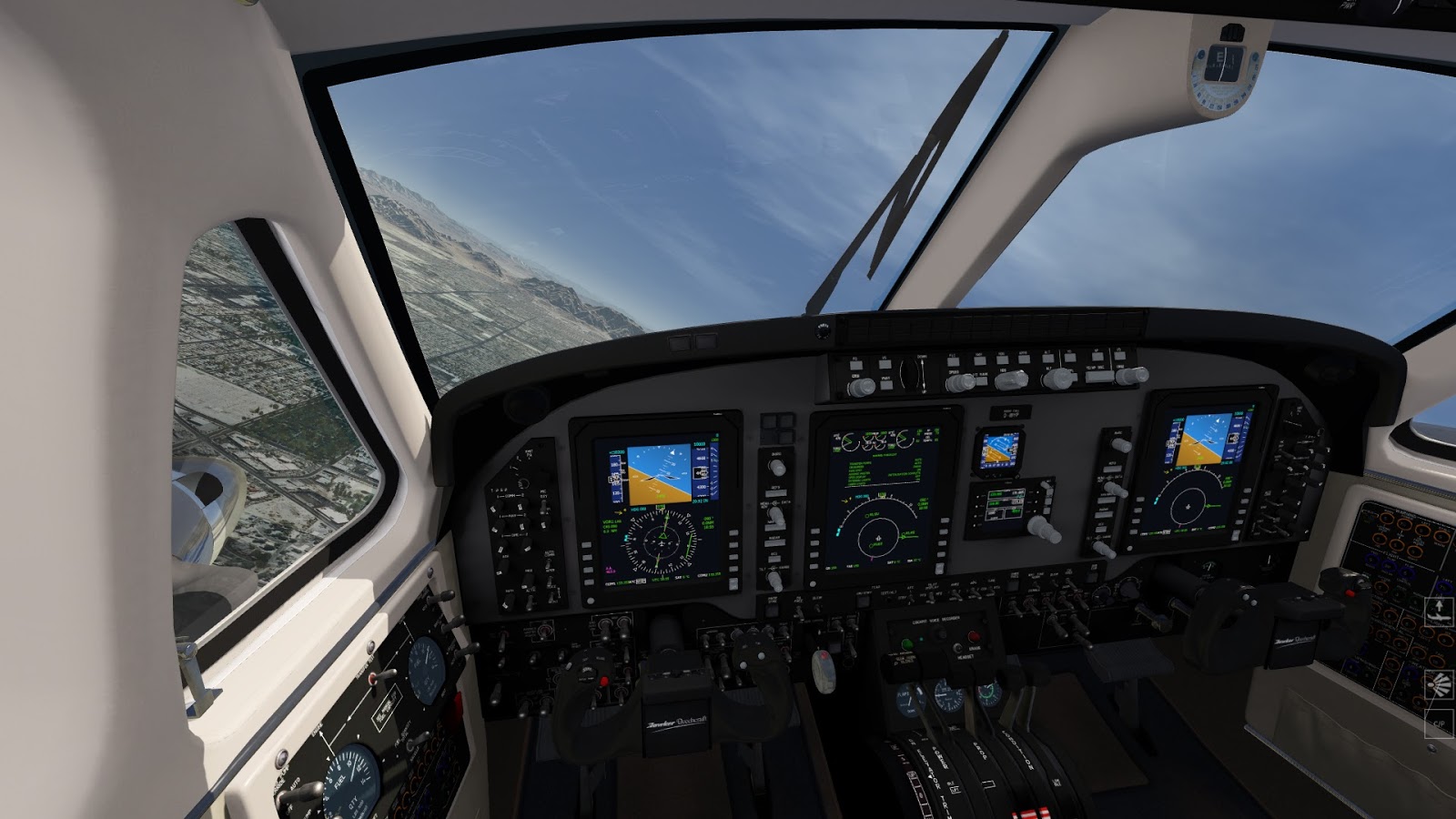
C90 King Air cockpit - in general the quality of the cockpits is high. You may argue that some systems are missing, but really if you compare AFS2 aircrafts with default FSX aircraft there is not much difference.
Pitts over the Grand Canyon - the photoreal textures are much more "crisp" than in FSX, and NO BLURRIES. The Grand Canyon is a spectacle to behold.
Subscribe to:
Posts (Atom)


