Showing posts with label Microsoft Flight Simulator. Show all posts

Friday, January 7, 2022

F-35 FREQUENTLY ASKED QUESTIONS


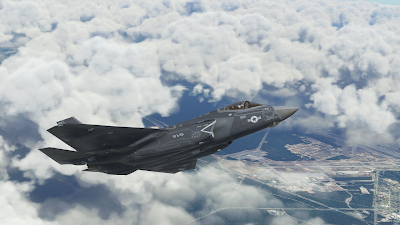
First, we'd like to thank you for the purchase of our F-35 LIGHTNING II aircraft for Microsoft Flight Simulator. We have received very positive feedback from most users, and we have also received a strong and very encouragig support from the community.

Still, the F-35 is a very complex project and, as expected we, are receiving a lot of questions. This document is intended to provide a reply to the most common ones.

Aside, unfortunately, the current Flight Simulator (“SU7 Update” build 1.21.18.0) is prone to Crash To Desktop (CTD) issues, which does not help.

While we had good reasons to believe that, by and large, any CTD you will experience flying the F-35 is due to the simulator and not to the aircraft, we understand that this may be frustrating and disappointing - and it is an undeniable fact that CTDs are way more frequent if you fly the F-35 than the default aircraft.

In the worst case, please bear in mind that we have a very flexible refund policy – managed via Paypal - that typically goes beyond the rights granted by your distributors and purchase contract, and even the applicable law.

If your experience is so bad that you wish to apply for a refund, please write an email to indiafoxtecho@gmail.com with:

- System details: CPU, GPU, RAM, OS
- Description of the problem
- Exact version of the simulator you are running
- Proof of purchase
- Paypal address for refund

...and we'll get back to you as soon as possible.

Question/Problem: I cannot even fly the plane! IMMEDIATE CRASH TO DESKTOP AS SOON AS THE PLANE LOADS!!!!

Answer: This is typically due to Direct X 12. Please understand tha DirectX 12 implementation in Microsoft Flight Simulator Sim Update 7 is still a Beta, and in particular does not support some programming technicques uses in the F-35. In general, we do not recommend using DirectX 12 – which, by the way, does not generate a significant performance improvement.

Suggested action: Please DISABLE DirectX 12


Question/Problem: I am experiencing random Crash To Desktop problems! And it is definitely a problem of the F-35 since no other aircraft does that!


We understand this can be frustrating and we are sorry for that, but unfortunately Sim Update 7 is prone to Crash to Desktop issues with a number of different aircrafts and add-ons. A quick seach with Google or in the MSFS forums should convince you that CTDs are a common occurrence for SU7.

Most users are flying the F-35 without many problems, which should already be a proof that the aircraft code is OK, but we have even had Microsoft/Asobo to test the aircraft before releasing it.

Still, we understand you may not be convinced so let's go through some of the causes that may contribute to CTDs.

First... here is the official Microsoft “Basic Troubleshooting” guide:

https://flightsimulator.zendesk.com/hc/en-us/articles/4406280399250-All-versions-Crashing-CTDs-issues-Basic-Troubleshooting

Out-of-Date Content: make sure that all the add-ons you have installed are up-to-date and compatible with your version of the simulator. Out-of-date content may cause crash to desktop (e.g. flying not too far from a problematic airport can cause CTD even if you cannot see the airport yet)

DirectX12 Beta: as stated above, DX12 implementation is a Beta and is not compatible with the F-35. Please do not use DX12

nVidia drivers and GeForce Experience: some versions of the nVidia drivers are known to generate CTD problems with MSFS. In particular 497.09 were problematic.
In general most users have a good experience with 497.29 or 496.76. Some users also needed to unistall GeForce Experience.

https://forums.flightsimulator.com/t/ctd-with-build-1-21-18-0-nvidia-drivers/479985/7

HAGS (on AMD graphic cards): it is recommended to disable HAGS, especially on AMD graphic cards.

https://forums.flightsimulator.com/t/tested-game-mode-and-hardware-accelerated-gpu-scheduling-hags/389677


English (US) Language Pack Installation: this seems to generate some problems for some users...

https://www.avsim.com/forums/topic/587760-ctd-zendesk-response/


Rolling Cache: some users had CTD problems due to the rolling cache:

https://flightsimulator.zendesk.com/hc/en-us/articles/360019202439-All-versions-How-to-delete-the-Rolling-Cache-and-the-Manual-Cache


Realtek Audio Drivers: these seem to be problematic on some installations, and they are listed in the Microsoft Zendesk guide... in any case here is a discussion on the Microsoft forums:

https://forums.flightsimulator.com/t/solved-my-ctds-after-months-of-being-down/470916

.NET framework and C++ redistributable out of date: some users reported getting rid of the CTDs after updating the .NET and C++ redistributables - however there is not a strong evidence this is a factor.

Live Weather (and other server-side problems): sometimes MSFS has CTDs just because of problems on the MS servers side – for example, recently Live Weather feature was causing CTDs for some users:

https://forums.flightsimulator.com/t/current-issue-with-live-weather-and-associated-ctd-and-possibly-black-screen-on-xbox/486177

Incompatible add-ons: some users reported that their CTDs have been solved by removing/disabling certain add-ons, such as NXi G1000. However this is anecdoctal information only, and in theory it should not happen.

...and the list goes on.

Thank being said, if your experience with the F-35 is not satisfactory and you regret your purchase, please contact us to discuss a refund.

Suggested action: Please see above for possible causes of CTDs.

IMPORTANT – FOR ADVANCED USERS! IF YOU KNOW HOW TO CREATE A CRASH DUMP FOR MICROSOFT FLIGHT SIMULATOR YOU MAY WANT TO PROVIDE IT TO US – WE WILL FORWARD IT TO MICROSOFT FOR ANALYSIS.

Question/Problem: My thottle is not working! It happens only on the F-35! Why is this happening?

This is typically a problem due to 1.21.18.0. At the moment of the release, the official MSFS version is 1.21.13.0, but there is the possibility to download 1.21.18.0 (via Steam Beta program or Microsoft Insider).
There seems to be a bug in 1.21.18.0 so that aircrafts that the throttle lever does not work for aircrafts do not use Asobo templates.

This is typically solved by changing the changing the axis assignment to THORTTLE AXIS 1 (instead of generic THOTTLE AXIS).

Suggested action: Please assign the throttle lever to THROTTLE AXIS 1

NOTE: you can assign the same slider/lever to multiple axis for multiengine aircrafts.


Question/Problem: I cannot get the plane to hover! And can it do vertical take-offs?


First thing, which may be obvious for most, please make sure you are flying with the F-35B, which is the only version.

To get the plane to hover, you must first be in the STOVL mode which can only be engaged in certain conditions (limited bank and roll angles, speed lower than 220kts) – this can be enabled by pressing the HOOK STOVL button or by the wing lights control.

Once in STOVL mode you can HOVER by clicking the HOVER caption or by using the AUTOPILOT HEADING HOLD key, but only if the aircraft is lighter than 40000 lbs.

If you enable HOVER mode on the ground, you can also perform a Vertical takeoff, but this is rarely done in reality due to weight constraints.

See manual for detailed instructions.

Question/Problem: I cannot see the aircraft in game! I am sure I have followed the instructions... help?


This is most likely due to an error during the manual installation process (in most cases the user has either picked the wrong folder, or has pasted the zip file instead of the unzipped folder).

Here is a video that shows the process of installing add-ons in the community folder.


Question/Problem: The landing light cycles on and off continuously during flight...very annoying? What can I do to fix that?

This is likely due to the fact that the user has a phisical switch assigned to the landing light switch. The F-35 code has provisions to turn off the landing lights if the gear is retracted... but this can create conflicts if there is a phisical switch. The physical switch must be either disabled or operated only when the landing gear is down and the light must be off when the landing gear is up.


Question/Problem: Is it possible to undock the primary control display to a separate screen?

No. The primary control display is coded in XML, and at the moment MSFS does not support 2D windows in XML.

Saturday, September 26, 2020

Aermacchi MB-339A for Microsoft Flight Simulator - BETA TEST


BETA TEST ACCESS INSTRUCTIONS

************ DUE TO THE LARGE NUMBER OF APPLICATIONS RECEIVED BETA TEST APPLICATIONS ARE SUSPENDED - INVITATIONS TO THE FIRST 30 SELECTED TESTERS HAVE BEEN SENT *************


Beta test is open to testers of all different skill levels and expertise.
In order to apply for the Beta Test, please drop an email to indiafoxtecho@gmail.com with the following information:
- System specification (no need of details or long explainations: just specify your CPU, Clock speed, RAM, GPU and dedicated video RAM)
- Real world flight experience (if any) - please keep it short!
- Simulation experience - please keep it short!
- Any special tie to the MB-339 or any reason why you really want to test this plane

Important! Subject of the email must be "MB339 MSFS Beta Test Application".

Please do not apply unless you have 4-5 hours to dedicate to test this aircraft!
Testing this aircraft is NOT a paid position in any way...if you do it, you do it only for the fun of it!

...and, due to the large number of applications we typically receive, we cannot grant a reply to everybody. If you do not receive a reply in a week or so, please assume you have not been admitted to the Beta - apologies in advance! 

DESIGN INTENT:

This is a medium complexity add-on which is meant to depict the Aermacchi MB-339 of the Frecce Tricolori in a detailed but accessible way. The key points of the package are as follows:
- Focus of the simulation is the Aermacchi MB-339PAN/MLU version. Visual variant for MB-339A/MLU is also provided
- Highly detailed external and internal model
- Flight model and systems simulation is based on default MSFS functionalities (no external code)
- Simple sound package 

The plane is intended for basic military jet training, formation flying and aerobatics.

BETA VERSION INSTALLATION INSTRUCTIONS:

Add-ons for Microsoft Flight Simulator are distributed as packages. Packages shall be placed in the "Community" folder. You will need to restart MSFS if the simulator was running when you have moved the files.

HOW TO REPORT BUGS:

The preferred way to report bugs is to add a comment to this post, specifying what is the experienced malfunction and when it happens. Pics are welcome.
PLEASE do not rush in reporting bugs - it is not a race - take your time and verify if it is a real problem and, if you think it is, try to understand when it happens exactly.
Alternatively, an email is good to. Comments are preferred so that other users can see them.
It is not a race, so take your time. The simulation is quite complex, so it may take some time to get acquainted with the plane… I'd suggest you log at least a couple of hours before submitting any feedback.
Also, PLEASE, before posting a bug make sure it is not already in the list below.

COLOR KEY:

Red - Higher priority: a severe bug that may hamper the usage of the aircraft
Yellow - Lower priority: definitely a defect, but not a high priority to solve it
Green - Problem solved, o mitigated to the level that it is acceptable.Dark Green - Problem solved or mitigated before the Beta 1 release.
Blue - Comment, nice-to-have features or suggestions

CHANGE REQUEST LOG AND TO-DO LIST

Current tester version BETA 1 - Released on 28/09/2020
Current internal build BETA 2 WIP 

Current metrics:

Red items: 0
Yellow items: 11
Green items: 41
Blue items: 1  
TOTAL CRs: 52
Progress toward release 78% :-(

Last changed by Dino on 10/10/2020

EXTERNAL MODEL:

There are two external models in the package. The star of the show, and default selection, is the MB-339PAN/MLU with standard loadout for the Frecce Tricolori Airshow. As visual alternative, a model for MB-339A (non MLU) with elliptical tiptanks is also provided. Externally MLU and non-MLU differ mostly for the fact that MLU has formation lights and some of the antennas are in different positions.
The two external models are separate files and should be tested separately - if you find a problem, please check if it is present in one or both models. 

MB339EXT001 - Better heat blur effect - slightly improved in Beta 2 (still somewhat small, but now aligned to the aircraft direction)...
MB339EXT002 - Missing Ice Blast effect - added ice blast effect
MB339EXT003 - Check beacon light on fuselage (visible only from below)? - FIXED in Beta 2
MB339EXT004 - Flood lights peek slightly through external views... FIXED in Beta 2
MB339EXT005 - Missing Landing Light animation from external model... FIXED in Beta 2

VIRTUAL COCKPIT:

As for the external model, two separate virtual cockpit models are included: PAN and A versions. Unlike the external models, both internal models include MLU changes. The PAN version differs from the A version since it lacks the gunsight but has smoke indicators and smoke control panel.

MB339VC001 - Throttle lever movement incorrect and should have STOP position - Fixed
MB339VC002 - GPS Display incomplete
MB339VC003 - MASTER CAUTION cannot be snoozed - Fixed
MB339VC004 - Caution panel incomplete (add at least JPT LIMIT and AIL SERVO) - FIXED in Beta2
MB339VC005 - Backlighting of main panel cannot be turned off
MB339VC006 - RNAV HSI mode to be checked
MB339VC007 - RNAV ADI mode to be checked
MB339VC008 - Control shift selectors always lit - FIXED in Beta2
MB339VC009 - Radio system not working? TO BE CHECKED, IT SHOULD WORK! - Checked: radio system seems to work as advertised, but mouse area is small. It is possible to use it with the mouse wheel, while dragging is somewhat cumbersome.
MB339VC010 - Transponder system not working? TO BE CHECKED IT SHOULD WORK! - Checked: radio system seems to work as advertised, but mouse area is small. It is possible to use it with the mouse wheel, while dragging is somewhat cumbersome.
MB339VC011 - Fuel total selector not working....not meant to work either, but still... - FIXED in Beta2
MB339VC012 - Fuel digital display not working - missing to be added - FIXED in Beta2
MB339VC013 - Trim buttons do not work - CHECKED versus flight manual: these are advisory lights only, cannot be pushed.
MB339VC014 - VOR needles on HSI are OK on ILS, but seem reversed in normal VOR operation (to be checked) - NOTE, initial check seems to be OK...maybe tester had the aircraft symbol reversed? If flying to TO station and heading towards bearing pointer 1, if aircraft symbol is upward behavior seems correct... further testing planned. BEHAVIOR SEEMS CORRECT
MB339VC015 - Unintended garbage geometry when canopy is open - FIXED for Beta 2
MB339VC016 - Would be nice to add ajustable formation lights
MB339VC017 - GEN1 and GEN2 weird glare - seems OK now, but in reality the bug was somewhat unclear...
MB339VC018 - Nav light selector should only select ON/OFF (bright/dim not selectable) - FIXED
MB339VC019 - Glitch in Transponder animation (some numbers not animated correctly) - FIXED for Beta 2
MB339VC020 - Electrical system: some systems are working even if battery is off provided that GEN 1 / GEN 2 are off even if engine was not running (hence electrical power shouldn't be available)... Issue likely due to Electrical Power availability variable...Should be fixed on Beta2... 
MB339VC021 - Toe brakes animation missing - FIXED for Beta 2
MB339VC022 - COM2 cannot be changed from cold and dark?
MB339VC023 - Speedbrake lever animation missing - FIXED for Beta 2
MB339VC024 - Request to animate the trim hat switch - FIXED for Beta 2 (although only for elevator)
MB339VC025 - Suggestion to remove the mouse tooltips for some controls, as they are done according to FSX/P3D conversion which is different from Asobo convention.
MB339VC026 - AOA frozen in icing condition even if anti-ice is on...
MB339VC027 - Digit "3" in altimeter shows too soon - FIXED for Beta 2
MB339VC028 - blinking glass in gunsight rendering - FIXED for Beta 2
MB339VC029 - AoA needle shows incorrect values - FIXED for Beta 2
MB339VC030 - Armament panel setting to be revised - FIXED for Beta 2
MB339VC031 - Fix Ail Servo and JPT limiter starting conditions - FIXED for Beta 2
MB339VC032 - Oxy Flow Switch incorrect position -. FIXED for Beta 2
MB339VC033 - GPS switches to be fixed according to new GPS Code - FIXED for Beta 2
MB339VC034 - Anti-Skid switch animation / light reversed - FIXED for Beta 2
MB339VC035 - Avionic master radio knob control does not work
MB339VC036 - Improve mirror rendering - FIXED for Beta 2
MB339VC037 - OMI Markers not working
MB339VC038 - Some lights are not visible in the VC - Fixed

FLIGHT MODEL:

The flight model has been tuned to mimic the performance of the MB-339PAN with airshow loadout. In this configuration the aircraft is somewhat slower than what most people think - achieving 350-370 knots maxium depeding on different factors.
The fuel capacity is limited to internal tanks only, irrespective of the external model.
NOTE: The aircraft should be able to fly all the formation maneuovres of the Frecce Tricolori programme, but is currently unable to replicate some parts of the solo programme.

MB339FM001 - Check center of gravity and COG limits - Revised in Beta 2
MB339FM002 - Max altitude about 30000ft (should be 45000+) - Engine performance vs altitude fixed in Beta 2
MB339FM003 - No stall? - Revised stall behavior for Beta 2
MB339FM004 - Aircarft too sensitive to NWS during takeoff run
MB339FM005 - Rudder effectiveness is excessive?
MB339FM006 - Request to implement external and wingtip fuel tanks
MB339FM007 - Landing AoA is incorrect

OTHER:

Due to MSFS limitations, the smoke system is NOT WORKING - although controls in the cockpit do work.
The sound system is using FSX legacy mode - hence some sound effects (e.g.rain sounds) are NOT supported.

MB339OT001 - Rework view order for those who do not use free look mode (apparently left and right instrument views are inverted) - FIXED in Beta 2
MB339OT002 - Review startup conditions
MB339OT003 - One user requested wider view angles for both landing and instrument views